


Dify 是什么
Dify 是 LangGenius 开源的 LLM 应用开发平台。它把工作流编排、知识库检索、智能体和模型供应商放在同一套界面里,用来搭建可对外提供 API 的对话应用。
与只做文档切分和向量检索不同,Dify 把提示词、知识库、工作流和模型调用留在自己的服务器上,并给这些应用提供 API。
Dify 能做什么
- 编排工作流:在画布上把模型、条件和工具串成多步流程。
- 接入模型:连接多家模型服务,或接入兼容 OpenAI API 的自建接口。
- 建立知识库:把 PDF、PPT 等文档收进检索管道,回答时先查这些材料。
- 配置智能体:为智能体选择工具,让它按任务去调用。
- 提供 API:把已经做好的应用接到自己的业务系统里。
为什么要使用 Dify
内部文档贴进公有聊天之后,内容会离开这台机器。只留一个聊天框时,多步流程、知识库和换模型的配置也带不走。
Dify 把工作流、知识库和模型供应商留在自己的服务器上,适合要做知识库问答、多步工作流,以及把对话接到现有系统的团队。
使用 Docker 部署 Dify
Dify 可以用 Docker 跑起来。网页、API、数据库、缓存、向量库和代码沙箱分成一组容器。部署前准备好 Docker,并准备登录后要填写的模型服务。
接下来用 Docker Compose 配置这一组服务,完成启动,并在浏览器里创建管理员账号。
环境要求
本文命令使用 1.18.0 版本,在 Ubuntu 24.04 上实测。这一版发布于 2026-10-23。langgenius/dify-web 是控制台页面,langgenius/dify-api 是 API、异步任务和定时任务共用的后端镜像。只启动网页容器,浏览器里没有可用的接口。
官方安装说明的最低配置是 2 核 CPU、4 GiB 内存。知识库的向量存在本机 Weaviate 里,文档多的时候请留出更多磁盘。
| 项目 | 建议 |
|---|---|
| 系统 | Linux(正文命令按 bash)。macOS 把 /www/wwwroot/dify 换成 ~/docker/dify。Windows 安装 Docker Desktop 后,在能执行 bash 的终端里运行下文命令 |
| Docker | Docker Engine 与 Compose V2(docker compose)。官方要求 Compose 2.24.0 及以上 |
| 架构 | 上述 Dify 镜像提供 linux/amd64 和 linux/arm64 |
| 配置 | 官方最低要求 2 核、4 GiB 内存 |
| 端口 | 宿主机 80 → Nginx 80;宿主机 443 → Nginx 443(默认不开启 HTTPS);宿主机 5003 → 插件远程调试。网页容器内的 3000 不映射到宿主机 |
| 工作目录 | /www/wwwroot/dify |
| 数据 | volumes/ 下放数据库、上传文件、Redis、Weaviate 和插件数据 |
| 账号 | 没有预置管理员。浏览器打开 /install 后自己设置 |
镜像里没有商业模型的调用额度。登录后在模型供应商里填写你自己的 API Key,对话和知识库向量化才会开始。
这一组容器的分工如下。
| 服务 | 镜像标签 | 作用 |
|---|---|---|
api / worker / worker_beat / api_websocket | langgenius/dify-api:1.18.0 | 同一镜像,用 MODE 区分 API、队列、定时任务和协作 WebSocket |
web | langgenius/dify-web:1.18.0 | 控制台页面,只在容器网络里监听 3000 |
db_postgres | postgres:15.19-alpine | 业务数据库 |
redis | redis:6.2.24-alpine | 缓存和 Celery 队列 |
weaviate | semitechnologies/weaviate:1.39.13 | 默认向量库 |
sandbox | langgenius/dify-sandbox:0.2.15 | 工作流里的代码执行 |
local_sandbox | langgenius/dify-agent-local-sandbox:1.18.0 | Agent 使用的命令沙箱 |
plugin_daemon | langgenius/dify-plugin-daemon:0.6.10-local | 插件运行时 |
agent_backend | langgenius/dify-agent-backend:1.18.0 | Agent 后端 |
ssrf_proxy / agent_ssrf_proxy | ubuntu/squid:6.6-24.04_beta | 出站代理 |
nginx | nginx:1.31.8 | 对外提供 80 和 443 |
init_permissions | busybox:1.37.0 | 启动前修改上传目录的属主,做完就退出 |
init_permissions 改完上传目录的属主就会退出,其余服务继续运行。
bashdocker --version
docker compose version
Linux 未装 Docker 可使用轩辕镜像一键安装脚本:
bashbash <(wget -qO- https://get.xuanyuan.cloud/docker.sh)
备用地址:
bashbash <(wget -qO- https://get.xuanyuan.me/docker.sh)
更多见 轩辕镜像使用手册。
Windows 和 Mac 从 Docker Desktop 安装,安装后启动 Docker Desktop。下文的 cat > … <<'EOF' 是 bash 写法。PowerShell 不能直接粘贴这些段落,请改用 Git Bash、WSL,或在 Linux 上执行。
标签怎么选
Dify 1.18.0 发布于 2026-10-23。langgenius/dify-web 和 langgenius/dify-api 上对应的具体标签都是 1.18.0。Docker Hub 上这两个标签的推送时间也是 2026-10-23,并且都有 amd64 和 arm64。
latest、main 和提交号会继续变化,本文命令不用它们。1.17.1 的 Agent 运行时不认识 1.18.0 本地沙箱的令牌参数,两组不要混用。
| 标签 | 说明 | 是否写入本文命令 |
|---|---|---|
langgenius/dify-api:1.18.0 | API、worker、定时任务、协作 WebSocket | 是 |
langgenius/dify-web:1.18.0 | 控制台页面 | 是 |
langgenius/dify-agent-backend:1.18.0 | Agent 后端,和 API 一起升级 | 是 |
langgenius/dify-agent-local-sandbox:1.18.0 | Agent 命令沙箱 | 是 |
langgenius/dify-sandbox:0.2.15 | 1.18.0 的 Compose 文件里写的代码沙箱 | 是 |
langgenius/dify-plugin-daemon:0.6.10-local | 1.18.0 的 Compose 文件里写的插件守护进程 | 是 |
latest / main / 提交号 | 会继续变化 | 否 |
1.17.1 | 上一版,Agent 运行时与 1.18.0 不配套 | 否 |
1.18.0 的 Compose 文件里,代码沙箱仍是 0.2.15,插件守护进程仍是 0.6.10-local。这两项保持上表的标签。同一份文件里,PostgreSQL 写的是 postgres:15-alpine,Redis 写的是 redis:6-alpine,Nginx 和 BusyBox 写的是 latest,Squid 写的是 ubuntu/squid:latest。这些名字还会指向更新的镜像。本文改成 PostgreSQL 15.19-alpine、Redis 6.2.24-alpine、Nginx 1.31.8、BusyBox 1.37.0。Docker Hub 上 ubuntu/squid:latest 与 6.6-24.04_beta 当前的 digest 相同,本文写 6.6-24.04_beta。
向量库这一版使用 Weaviate 1.39.13。Compose 文件里的坐标是 cr.weaviate.io/semitechnologies/weaviate:1.39.13。Docker Hub 上同一版本标签是 semitechnologies/weaviate:1.39.13,本文用后者。
完整标签见 langgenius/dify-web 标签列表 和 langgenius/dify-api 标签列表。
拉取镜像
用 轩辕镜像 加速拉取。先拉页面和 API,再拉同一套部署里的其余镜像。
bashdocker pull docker.xuanyuan.run/langgenius/dify-api:1.18.0
docker pull docker.xuanyuan.run/langgenius/dify-web:1.18.0
docker pull docker.xuanyuan.run/langgenius/dify-sandbox:0.2.15
docker pull docker.xuanyuan.run/langgenius/dify-plugin-daemon:0.6.10-local
docker pull docker.xuanyuan.run/langgenius/dify-agent-backend:1.18.0
docker pull docker.xuanyuan.run/langgenius/dify-agent-local-sandbox:1.18.0
docker pull docker.xuanyuan.run/library/postgres:15.19-alpine
docker pull docker.xuanyuan.run/library/redis:6.2.24-alpine
docker pull docker.xuanyuan.run/library/nginx:1.31.8
docker pull docker.xuanyuan.run/library/busybox:1.37.0
docker pull docker.xuanyuan.run/ubuntu/squid:6.6-24.04_beta
docker pull docker.xuanyuan.run/semitechnologies/weaviate:1.39.13
Ubuntu 24.04 实测,每条命令完成时的结果:
textDigest: sha256:0120970fb4ea59aa328d63b7dda635cccc071efb8aae470cd07115a026dbffd3
Status: Downloaded newer image for docker.xuanyuan.run/langgenius/dify-api:1.18.0
docker.xuanyuan.run/langgenius/dify-api:1.18.0

Digest: sha256:e55a6bf1addf109c3655567663f906624f0980061efed864e0f07d23c71fa385
Status: Downloaded newer image for docker.xuanyuan.run/langgenius/dify-web:1.18.0
docker.xuanyuan.run/langgenius/dify-web:1.18.0

Digest: sha256:750e1111426ef31a9217b81c98cccfb750f17b182af3221102e420afa9f0928e
Status: Downloaded newer image for docker.xuanyuan.run/langgenius/dify-sandbox:0.2.15
docker.xuanyuan.run/langgenius/dify-sandbox:0.2.15

Digest: sha256:34412a22d1e1d1a6c73727fef88cffbcdd9be7a21bf9ad3076b4bf5c1b88fd9b
Status: Downloaded newer image for docker.xuanyuan.run/langgenius/dify-plugin-daemon:0.6.10-local
docker.xuanyuan.run/langgenius/dify-plugin-daemon:0.6.10-local

Digest: sha256:80d638d7114bb0fbe954952e37da1f464b61969ff870c0b173963b9f2b91e06e
Status: Downloaded newer image for docker.xuanyuan.run/langgenius/dify-agent-backend:1.18.0
docker.xuanyuan.run/langgenius/dify-agent-backend:1.18.0

Digest: sha256:4c0bdcae2069df2bc4ba4e32547ac898cb66204378634f630d874c51ad81b1fd
Status: Downloaded newer image for docker.xuanyuan.run/langgenius/dify-agent-local-sandbox:1.18.0
docker.xuanyuan.run/langgenius/dify-agent-local-sandbox:1.18.0

Digest: sha256:54e0dd8e8cddcdbb9156c2486eed5a43eccb7214d7c6828097d41ce049fb3984
Status: Downloaded newer image for docker.xuanyuan.run/library/postgres:15.19-alpine
docker.xuanyuan.run/library/postgres:15.19-alpine

Digest: sha256:63d5174750e285bc3069c4519c53c8b6de6ebe70715140a6c9d21d6f04b77319
Status: Downloaded newer image for docker.xuanyuan.run/library/redis:6.2.24-alpine
docker.xuanyuan.run/library/redis:6.2.24-alpine

Digest: sha256:bdf57e528e45e4433820e045b29b4597825a1c9e38353532d90a01445013f82e
Status: Downloaded newer image for docker.xuanyuan.run/library/busybox:1.37.0
docker.xuanyuan.run/library/busybox:1.37.0

Digest: sha256:6a097f68bae708cedbabd6188d68c7e2e7a38cedd05a176e1cc0ba29e3bbe029
Status: Downloaded newer image for docker.xuanyuan.run/ubuntu/squid:6.6-24.04_beta
docker.xuanyuan.run/ubuntu/squid:6.6-24.04_beta

Digest: sha256:ad2b986bbe4666fbd5302a5ee0cc6c74a048c4c769198d46147ea232d46a2dd8
Status: Downloaded newer image for docker.xuanyuan.run/semitechnologies/weaviate:1.39.13
docker.xuanyuan.run/semitechnologies/weaviate:1.39.13

Digest: sha256:c4d1df1ca40ef8cf932f19853f00eb0f81ffe5becda1256365bbf0a057060ffb
Status: Downloaded newer image for docker.xuanyuan.run/library/nginx:1.31.8
docker.xuanyuan.run/library/nginx:1.31.8
拉取完成后确认这些标签已经在本地,再写配置:
bashfor image in
  docker.xuanyuan.run/langgenius/dify-api:1.18.0
  docker.xuanyuan.run/langgenius/dify-web:1.18.0
  docker.xuanyuan.run/langgenius/dify-sandbox:0.2.15
  docker.xuanyuan.run/langgenius/dify-plugin-daemon:0.6.10-local
  docker.xuanyuan.run/langgenius/dify-agent-backend:1.18.0
  docker.xuanyuan.run/langgenius/dify-agent-local-sandbox:1.18.0
  docker.xuanyuan.run/library/postgres:15.19-alpine
  docker.xuanyuan.run/library/redis:6.2.24-alpine
  docker.xuanyuan.run/library/nginx:1.31.8
  docker.xuanyuan.run/library/busybox:1.37.0
  docker.xuanyuan.run/ubuntu/squid:6.6-24.04_beta
  docker.xuanyuan.run/semitechnologies/weaviate:1.39.13
do
  docker image inspect "$image" --format '{{index .RepoTags 0}} {{.Id}}'
done
某一行报错,就先把那一个镜像重新拉取,不要继续往下启动。这次第一次检查时本机还没有 library/nginx:1.31.8,补拉之后再执行上面的循环,12 条都有 Id:
textdocker.xuanyuan.run/langgenius/dify-api:1.18.0 sha256:0120970fb4ea59aa328d63b7dda635cccc071efb8aae470cd07115a026dbffd3
docker.xuanyuan.run/langgenius/dify-web:1.18.0 sha256:e55a6bf1addf109c3655567663f906624f0980061efed864e0f07d23c71fa385
docker.xuanyuan.run/langgenius/dify-sandbox:0.2.15 sha256:750e1111426ef31a9217b81c98cccfb750f17b182af3221102e420afa9f0928e
docker.xuanyuan.run/langgenius/dify-plugin-daemon:0.6.10-local sha256:34412a22d1e1d1a6c73727fef88cffbcdd9be7a21bf9ad3076b4bf5c1b88fd9b
docker.xuanyuan.run/langgenius/dify-agent-backend:1.18.0 sha256:80d638d7114bb0fbe954952e37da1f464b61969ff870c0b173963b9f2b91e06e
docker.xuanyuan.run/langgenius/dify-agent-local-sandbox:1.18.0 sha256:4c0bdcae2069df2bc4ba4e32547ac898cb66204378634f630d874c51ad81b1fd
docker.xuanyuan.run/library/postgres:15.19-alpine sha256:54e0dd8e8cddcdbb9156c2486eed5a43eccb7214d7c6828097d41ce049fb3984
docker.xuanyuan.run/library/redis:6.2.24-alpine sha256:63d5174750e285bc3069c4519c53c8b6de6ebe70715140a6c9d21d6f04b77319
docker.xuanyuan.run/library/nginx:1.31.8 sha256:c4d1df1ca40ef8cf932f19853f00eb0f81ffe5becda1256365bbf0a057060ffb
docker.xuanyuan.run/library/busybox:1.37.0 sha256:bdf57e528e45e4433820e045b29b4597825a1c9e38353532d90a01445013f82e
docker.xuanyuan.run/ubuntu/squid:6.6-24.04_beta sha256:6a097f68bae708cedbabd6188d68c7e2e7a38cedd05a176e1cc0ba29e3bbe029
docker.xuanyuan.run/semitechnologies/weaviate:1.39.13 sha256:ad2b986bbe4666fbd5302a5ee0cc6c74a048c4c769198d46147ea232d46a2dd8
Docker Compose 部署
工作目录是 /www/wwwroot/dify。数据库、上传文件、Redis、Weaviate 和插件数据都在 volumes/。删掉这个目录会丢掉已经创建的管理员、知识库和上传文件。docker compose down 不加 -v 时,不会删除这个目录,也不会删除文末两个命名卷。
.env 里的数据库口令、Redis 口令和 Weaviate 密钥来自 1.18.0 的示例配置,默认值只为了能启动。机器会从公网访问时,在第一次启动前把同一组口令一起改掉。只改 DB_PASSWORD、不改 CELERY_BROKER_URL 里的 Redis 口令,队列会连不上。口令不要加空格。
- 创建目录,并把属主交给当前用户,后面的
cat才不用反复加sudo。
bashsudo mkdir -p /www/wwwroot/dify/nginx/conf.d
  /www/wwwroot/dify/nginx/ssl
  /www/wwwroot/dify/ssrf_proxy
  /www/wwwroot/dify/volumes/app/storage
  /www/wwwroot/dify/volumes/db/data
  /www/wwwroot/dify/volumes/redis/data
  /www/wwwroot/dify/volumes/weaviate
  /www/wwwroot/dify/volumes/sandbox/conf
  /www/wwwroot/dify/volumes/sandbox/dependencies
  /www/wwwroot/dify/volumes/plugin_daemon
  /www/wwwroot/dify/volumes/certbot/conf/live
  /www/wwwroot/dify/volumes/certbot/www
sudo chown -R "$USER:$USER" /www/wwwroot/dify
- 写入
.env。这是 1.18.0 启动所需的变量。DIFY_AGENT_LOCAL_SANDBOX_AUTH_TOKEN先留空,下一步再填。
bashcd /www/wwwroot/dify
cat > .env <<'EOF'
# ------------------------------------------------------------------
# Essential defaults for Docker Compose deployments.
# Only include variables required for services to start.
# Do not add optional variables to this file.
#
# For a default deployment, copy this file to .env and run:
#   docker compose up -d
#
# Optional and provider-specific variables live under docker/envs/.
# Copy an optional *.env.example file beside itself without the
# .example suffix when you need those advanced settings.
# Values in docker/.env take precedence over docker/envs/*.env files.
# ------------------------------------------------------------------

# Core service URLs
CONSOLE_API_URL=
SERVER_CONSOLE_API_URL=http://api:5001
CONSOLE_WEB_URL=
SERVICE_API_URL=
TRIGGER_URL=http://localhost
APP_API_URL=
APP_WEB_URL=
FILES_URL=
INTERNAL_FILES_URL=
ENDPOINT_URL_TEMPLATE=http://localhost/e/{hook_id}
NEXT_PUBLIC_SOCKET_URL=ws://localhost

# Runtime and security
LANG=C.UTF-8
LC_ALL=C.UTF-8
PYTHONIOENCODING=utf-8
# Leave empty to auto-generate a persistent key in the storage directory.
SECRET_KEY=
INIT_PASSWORD=
DEPLOY_ENV=PRODUCTION
CHECK_UPDATE_URL=https://updates.dify.ai
OPENAI_API_BASE=https://api.openai.com/v1
MIGRATION_ENABLED=true
FILES_ACCESS_TIMEOUT=300
# Remove `collaboration` from COMPOSE_PROFILES to stop the dedicated websocket service.
ENABLE_COLLABORATION_MODE=true

# Logging and server workers
LOG_LEVEL=INFO
LOG_OUTPUT_FORMAT=text
LOG_FILE=/app/logs/server.log
LOG_FILE_MAX_SIZE=20
LOG_FILE_BACKUP_COUNT=5
LOG_DATEFORMAT=%Y-%m-%d %H:%M:%S
LOG_TZ=UTC
DEBUG=false
FLASK_DEBUG=false
ENABLE_REQUEST_LOGGING=False
DIFY_BIND_ADDRESS=0.0.0.0
DIFY_PORT=5001
SERVER_WORKER_AMOUNT=1
SERVER_WORKER_CLASS=gevent
SERVER_WORKER_CONNECTIONS=10
API_WEBSOCKET_WORKER_AMOUNT=1
API_WEBSOCKET_WORKER_CLASS=geventwebsocket.gunicorn.workers.GeventWebSocketWorker
API_WEBSOCKET_WORKER_CONNECTIONS=1000
API_WEBSOCKET_GUNICORN_TIMEOUT=360
GUNICORN_TIMEOUT=360
CELERY_WORKER_CLASS=
CELERY_WORKER_AMOUNT=4
CELERY_AUTO_SCALE=false
CELERY_MAX_WORKERS=
CELERY_MIN_WORKERS=
COMPOSE_WORKER_HEALTHCHECK_DISABLED=true
COMPOSE_WORKER_HEALTHCHECK_INTERVAL=30s
COMPOSE_WORKER_HEALTHCHECK_TIMEOUT=30s

# Database
DB_TYPE=postgresql
DB_USERNAME=postgres
DB_PASSWORD=difyai123456
DB_HOST=db_postgres
DB_PORT=5432
DB_DATABASE=dify
SQLALCHEMY_POOL_SIZE=30
SQLALCHEMY_MAX_OVERFLOW=10
SQLALCHEMY_POOL_RECYCLE=3600
SQLALCHEMY_ECHO=false
SQLALCHEMY_POOL_PRE_PING=false
SQLALCHEMY_POOL_USE_LIFO=false
SQLALCHEMY_POOL_TIMEOUT=30
SQLALCHEMY_POOL_RESET_ON_RETURN=rollback
PGDATA=/var/lib/postgresql/data/pgdata
POSTGRES_MAX_CONNECTIONS=200
POSTGRES_SHARED_BUFFERS=128MB
POSTGRES_WORK_MEM=4MB
POSTGRES_MAINTENANCE_WORK_MEM=64MB
POSTGRES_EFFECTIVE_CACHE_SIZE=4096MB
POSTGRES_STATEMENT_TIMEOUT=0
POSTGRES_IDLE_IN_TRANSACTION_SESSION_TIMEOUT=0

# Redis and Celery
REDIS_HOST=redis
REDIS_PORT=6379
REDIS_USERNAME=
REDIS_PASSWORD=difyai123456
REDIS_USE_SSL=false
REDIS_SSL_CERT_REQS=CERT_NONE
REDIS_SSL_CA_CERTS=
REDIS_SSL_CERTFILE=
REDIS_SSL_KEYFILE=
REDIS_DB=0
REDIS_KEY_PREFIX=
REDIS_MAX_CONNECTIONS=
REDIS_RETRY_RETRIES=3
REDIS_RETRY_BACKOFF_BASE=1.0
REDIS_RETRY_BACKOFF_CAP=10.0
REDIS_SOCKET_TIMEOUT=5.0
REDIS_SOCKET_CONNECT_TIMEOUT=5.0
REDIS_HEALTH_CHECK_INTERVAL=30
REDIS_KEEPALIVE=true
REDIS_KEEPALIVE_IDLE=30
REDIS_KEEPALIVE_INTERVAL=10
REDIS_KEEPALIVE_COUNT=10
CELERY_BROKER_URL=redis://:difyai123456@redis:6379/1
CELERY_BACKEND=redis
BROKER_USE_SSL=false
CELERY_TASK_ANNOTATIONS=null
EVENT_BUS_REDIS_URL=
EVENT_BUS_REDIS_CHANNEL_TYPE=pubsub
EVENT_BUS_REDIS_USE_CLUSTERS=false

# Web and app limits
WEB_API_CORS_ALLOW_ORIGINS=*
CONSOLE_CORS_ALLOW_ORIGINS=*
COOKIE_DOMAIN=
NEXT_PUBLIC_COOKIE_DOMAIN=
NEXT_PUBLIC_BATCH_CONCURRENCY=5
API_SENTRY_DSN=
API_SENTRY_TRACES_SAMPLE_RATE=1.0
API_SENTRY_PROFILES_SAMPLE_RATE=1.0
WEB_SENTRY_DSN=
AMPLITUDE_API_KEY=
TURNSTILE_SITE_KEY=
TEXT_GENERATION_TIMEOUT_MS=60000
CSP_WHITELIST=
ALLOW_EMBED=false
ALLOW_UNSAFE_DATA_SCHEME=false
TOP_K_MAX_VALUE=10
INDEXING_MAX_SEGMENTATION_TOKENS_LENGTH=4000
LOOP_NODE_MAX_COUNT=100
MAX_TOOLS_NUM=10
MAX_PARALLEL_LIMIT=10
MAX_ITERATIONS_NUM=99
MAX_TREE_DEPTH=50
ENABLE_WEBSITE_JINAREADER=true
ENABLE_WEBSITE_FIRECRAWL=true
ENABLE_WEBSITE_WATERCRAWL=true
NEXT_PUBLIC_ENABLE_SINGLE_DOLLAR_LATEX=false
NEXT_PUBLIC_ENABLE_AGENT_V2=true
EXPERIMENTAL_ENABLE_VINEXT=false

# Storage and default vector store
STORAGE_TYPE=opendal
OPENDAL_SCHEME=fs
OPENDAL_FS_ROOT=storage
VECTOR_STORE=weaviate
VECTOR_INDEX_NAME_PREFIX=Vector_index
WEAVIATE_ENDPOINT=http://weaviate:8080
WEAVIATE_API_KEY=WVF5YThaHlkYwhGUSmCRgsX3tD5ngdN8pkih
WEAVIATE_GRPC_ENDPOINT=grpc://weaviate:50051
WEAVIATE_TOKENIZATION=word
WEAVIATE_PERSISTENCE_DATA_PATH=/var/lib/weaviate
WEAVIATE_QUERY_DEFAULTS_LIMIT=25
WEAVIATE_AUTHENTICATION_ANONYMOUS_ACCESS_ENABLED=true
WEAVIATE_DEFAULT_VECTORIZER_MODULE=none
WEAVIATE_CLUSTER_HOSTNAME=node1
WEAVIATE_AUTHENTICATION_APIKEY_ENABLED=true
WEAVIATE_AUTHENTICATION_APIKEY_ALLOWED_KEYS=WVF5YThaHlkYwhGUSmCRgsX3tD5ngdN8pkih
WEAVIATE_AUTHENTICATION_APIKEY_USERS=hello@dify.ai
WEAVIATE_AUTHORIZATION_ADMINLIST_ENABLED=true
WEAVIATE_AUTHORIZATION_ADMINLIST_USERS=hello@dify.ai
WEAVIATE_DISABLE_TELEMETRY=false
WEAVIATE_ENABLE_TOKENIZER_GSE=false
WEAVIATE_ENABLE_TOKENIZER_KAGOME_JA=false
WEAVIATE_ENABLE_TOKENIZER_KAGOME_KR=false

# Sandbox and SSRF proxy
CODE_EXECUTION_ENDPOINT=http://sandbox:8194
CODE_EXECUTION_API_KEY=dify-sandbox
CODE_EXECUTION_SSL_VERIFY=True
CODE_EXECUTION_POOL_MAX_CONNECTIONS=100
CODE_EXECUTION_POOL_MAX_KEEPALIVE_CONNECTIONS=20
CODE_EXECUTION_POOL_KEEPALIVE_EXPIRY=5.0
CODE_EXECUTION_CONNECT_TIMEOUT=10
CODE_EXECUTION_READ_TIMEOUT=60
CODE_EXECUTION_WRITE_TIMEOUT=10
SANDBOX_API_KEY=dify-sandbox
SANDBOX_GIN_MODE=release
SANDBOX_WORKER_TIMEOUT=15
SANDBOX_ENABLE_NETWORK=true
SANDBOX_HTTP_PROXY=http://ssrf_proxy:3128
SANDBOX_HTTPS_PROXY=http://ssrf_proxy:3128
SANDBOX_PORT=8194
PIP_MIRROR_URL=
SSRF_PROXY_HTTP_URL=http://ssrf_proxy:3128
SSRF_PROXY_HTTPS_URL=http://ssrf_proxy:3128
SSRF_HTTP_PORT=3128
SSRF_COREDUMP_DIR=/var/spool/squid
SSRF_DEFAULT_TIME_OUT=5
SSRF_DEFAULT_CONNECT_TIME_OUT=5
SSRF_DEFAULT_READ_TIME_OUT=5
SSRF_DEFAULT_WRITE_TIME_OUT=5
SSRF_POOL_MAX_CONNECTIONS=100
SSRF_POOL_MAX_KEEPALIVE_CONNECTIONS=20
SSRF_POOL_KEEPALIVE_EXPIRY=5.0
# Comma-separated CIDR ranges that the SSRF proxy should allow even when they
# resolve to private, loopback, link-local, or otherwise non-public addresses.
# Leave empty (the default) to keep the deny-by-default policy. Required when
# Dify needs to reach internal HTTP endpoints (e.g. an internal API on
# http://172.21.x.x) from an HTTP Request node, a tool, or a plugin.
# Example: SSRF_PROXY_ALLOW_PRIVATE_IPS=172.21.0.0/16,10.0.0.0/8
SSRF_PROXY_ALLOW_PRIVATE_IPS=

# Plugin daemon
DB_PLUGIN_DATABASE=dify_plugin
EXPOSE_PLUGIN_DAEMON_PORT=5002
PLUGIN_DAEMON_PORT=5002
PLUGIN_DAEMON_KEY=lYkiYYT6owG+71oLerGzA7GXCgOT++6ovaezWAjpCjf+Sjc3ZtU+qUEi
PLUGIN_DAEMON_URL=http://plugin_daemon:5002
PLUGIN_MAX_PACKAGE_SIZE=52428800
PLUGIN_MAX_FILE_SIZE=52428800
PLUGIN_MODEL_SCHEMA_CACHE_TTL=3600
PLUGIN_PPROF_ENABLED=false
PLUGIN_DEBUGGING_HOST=0.0.0.0
PLUGIN_DEBUGGING_PORT=5003
EXPOSE_PLUGIN_DEBUGGING_HOST=localhost
EXPOSE_PLUGIN_DEBUGGING_PORT=5003
PLUGIN_DIFY_INNER_API_KEY=QaHbTe77CtuXmsfyhR7+vRjI/+XbV1AaFy691iy+kGDv2Jvy0/eAh8Y1
PLUGIN_DIFY_INNER_API_URL=http://api:5001
FORCE_VERIFYING_SIGNATURE=true
PLUGIN_STDIO_BUFFER_SIZE=1024
PLUGIN_STDIO_MAX_BUFFER_SIZE=5242880
PLUGIN_PYTHON_ENV_INIT_TIMEOUT=120
PLUGIN_MAX_EXECUTION_TIMEOUT=600
PLUGIN_STORAGE_TYPE=local
PLUGIN_STORAGE_LOCAL_ROOT=/app/storage
PLUGIN_WORKING_PATH=/app/storage/cwd
PLUGIN_INSTALLED_PATH=plugin
PLUGIN_PACKAGE_CACHE_PATH=plugin_packages
PLUGIN_MEDIA_CACHE_PATH=assets
PLUGIN_STORAGE_OSS_BUCKET=
PLUGIN_SENTRY_ENABLED=false
PLUGIN_SENTRY_DSN=
MARKETPLACE_ENABLED=true
MARKETPLACE_API_URL=https://marketplace.dify.ai
MARKETPLACE_URL=

# Dify Agent backend
AGENT_BACKEND_BASE_URL=http://agent_backend:5050
# Bearer token for the Agent backend control-plane API.
# Replace this development default in production.
# Generate one with: python -c 'import secrets; print(secrets.token_urlsafe(32))'
DIFY_AGENT_API_TOKEN=dify-agent-run-token-for-dev-only
# Leave empty to derive from REDIS_PASSWORD.
DIFY_AGENT_REDIS_URL=
# Leave empty to derive from PLUGIN_DAEMON_URL and PLUGIN_DAEMON_KEY.
DIFY_AGENT_PLUGIN_DAEMON_URL=
DIFY_AGENT_PLUGIN_DAEMON_API_KEY=
# Leave empty to derive from PLUGIN_DIFY_INNER_API_URL and PLUGIN_DIFY_INNER_API_KEY.
# DIFY_AGENT_INNER_API_KEY must match API/worker INNER_API_KEY_FOR_PLUGIN, not INNER_API_KEY.
DIFY_AGENT_INNER_API_URL=
DIFY_AGENT_INNER_API_KEY=
# Select exactly one coherent Home Snapshot + Sandbox backend.
DIFY_AGENT_RUNTIME_BACKEND=local
DIFY_AGENT_LOCAL_SANDBOX_ENDPOINT=http://local_sandbox:5004
DIFY_AGENT_LOCAL_SANDBOX_AUTH_TOKEN=
# Sandbox-reachable Dify API base for dify-agent CLI /files/* transfers.
# Remote Sandboxes should use the public Dify ingress; local Compose uses api via agent_ssrf_proxy.
DIFY_AGENT_SANDBOX_FILES_BASE_URL=http://api:5001
DIFY_AGENT_STUB_API_BASE_URL=http://agent_backend:5050/agent-stub
# This is security-sensitive: it derives the JWE encryption key for Agent Stub bearer tokens.
# Replace this development default in production.
# Generate one with: python -c 'import secrets; print(secrets.token_urlsafe(32))'
DIFY_AGENT_SERVER_SECRET_KEY=MDEyMzQ1Njc4OWFiY2RlZjAxMjM0NTY3ODlhYmNkZWY

# Nginx and Docker Compose
NGINX_SERVER_NAME=_
NGINX_HTTPS_ENABLED=false
NGINX_PORT=80
NGINX_SSL_PORT=443
NGINX_SSL_CERT_FILENAME=dify.crt
NGINX_SSL_CERT_KEY_FILENAME=dify.key
NGINX_SSL_PROTOCOLS=TLSv1.2 TLSv1.3
NGINX_WORKER_PROCESSES=auto
NGINX_CLIENT_MAX_BODY_SIZE=100M
NGINX_KEEPALIVE_TIMEOUT=65
NGINX_PROXY_READ_TIMEOUT=3600s
NGINX_PROXY_SEND_TIMEOUT=3600s
NGINX_ENABLE_CERTBOT_CHALLENGE=false
NGINX_SOCKET_IO_UPSTREAM=api_websocket:5001
EXPOSE_NGINX_PORT=80
EXPOSE_NGINX_SSL_PORT=443
COMPOSE_PROFILES=${VECTOR_STORE:-weaviate},${DB_TYPE:-postgresql},collaboration
EOF
.env 末尾的 COMPOSE_PROFILES 保留即可。启动时直接执行 docker compose up -d,不必再加 --profile。
- 本地 Agent 沙箱要求令牌不为空。生成一串随机值并写回
.env。macOS 把sed -i改成sed -i ''。
bashcd /www/wwwroot/dify
TOKEN=$(openssl rand -base64 32 | tr -d '
')
sed -i "s|^DIFY_AGENT_LOCAL_SANDBOX_AUTH_TOKEN=.*|DIFY_AGENT_LOCAL_SANDBOX_AUTH_TOKEN=${TOKEN}|" .env
grep '^DIFY_AGENT_LOCAL_SANDBOX_AUTH_TOKEN=' .env | cut -d= -f1
最后一行只打印变量名。看到 DIFY_AGENT_LOCAL_SANDBOX_AUTH_TOKEN 即可,等号后面的令牌不会出现在这行输出里。
- 写入 Nginx 配置。页面和 API 都由 Nginx 转发。网页容器的 3000 只在容器网络里监听,浏览器走宿主机 80。
bashcd /www/wwwroot/dify
cat > nginx/nginx.conf.template <<'EOF'
# Please do not directly edit this file. Instead, modify the .env variables related to NGINX configuration.

user  nginx;
worker_processes  ${NGINX_WORKER_PROCESSES};

error_log  /var/log/nginx/error.log notice;
pid        /var/run/nginx.pid;


events {
    worker_connections  1024;
}


http {
    include       /etc/nginx/mime.types;
    default_type  application/octet-stream;

    log_format  main  '$remote_addr - $remote_user [$time_local] "$request" '
                      '$status $body_bytes_sent "$http_referer" '
                      '"$http_user_agent" "$http_x_forwarded_for"';

    access_log  /var/log/nginx/access.log  main;

    sendfile        on;
    #tcp_nopush     on;

    keepalive_timeout  ${NGINX_KEEPALIVE_TIMEOUT};

    #gzip  on;
    client_max_body_size ${NGINX_CLIENT_MAX_BODY_SIZE};

    include /etc/nginx/conf.d/*.conf;
}
EOF
bashcd /www/wwwroot/dify
cat > nginx/proxy.conf.template <<'EOF'
# Please do not directly edit this file. Instead, modify the .env variables related to NGINX configuration.

proxy_set_header Host $host;
# real_ip configuration must validate upstream proxies before replacing $remote_addr.
proxy_set_header X-Forwarded-For $remote_addr;
proxy_set_header X-Forwarded-Proto $scheme;
proxy_set_header X-Forwarded-Port $server_port;
proxy_http_version 1.1;
proxy_set_header Connection "";
proxy_buffering off;
proxy_read_timeout ${NGINX_PROXY_READ_TIMEOUT};
proxy_send_timeout ${NGINX_PROXY_SEND_TIMEOUT};
EOF
bashcd /www/wwwroot/dify
cat > nginx/https.conf.template <<'EOF'
# Please do not directly edit this file. Instead, modify the .env variables related to NGINX configuration.

listen ${NGINX_SSL_PORT} ssl;
ssl_certificate ${SSL_CERTIFICATE_PATH};
ssl_certificate_key ${SSL_CERTIFICATE_KEY_PATH};
ssl_protocols ${NGINX_SSL_PROTOCOLS};
ssl_prefer_server_ciphers on;
ssl_session_cache shared:SSL:10m;
ssl_session_timeout 10m;
EOF
bashcd /www/wwwroot/dify
cat > nginx/docker-entrypoint.sh <<'EOF'
#!/bin/bash

HTTPS_CONFIG=''

if [ "${NGINX_HTTPS_ENABLED}" = "true" ]; then
    # Check if the certificate and key files for the specified domain exist
    if [ -n "${CERTBOT_DOMAIN}" ] &&
       [ -f "/etc/letsencrypt/live/${CERTBOT_DOMAIN}/${NGINX_SSL_CERT_FILENAME}" ] &&
       [ -f "/etc/letsencrypt/live/${CERTBOT_DOMAIN}/${NGINX_SSL_CERT_KEY_FILENAME}" ]; then
        SSL_CERTIFICATE_PATH="/etc/letsencrypt/live/${CERTBOT_DOMAIN}/${NGINX_SSL_CERT_FILENAME}"
        SSL_CERTIFICATE_KEY_PATH="/etc/letsencrypt/live/${CERTBOT_DOMAIN}/${NGINX_SSL_CERT_KEY_FILENAME}"
    else
        SSL_CERTIFICATE_PATH="/etc/ssl/${NGINX_SSL_CERT_FILENAME}"
        SSL_CERTIFICATE_KEY_PATH="/etc/ssl/${NGINX_SSL_CERT_KEY_FILENAME}"
    fi
    export SSL_CERTIFICATE_PATH
    export SSL_CERTIFICATE_KEY_PATH

    # set the HTTPS_CONFIG environment variable to the content of the https.conf.template
    HTTPS_CONFIG=$(envsubst < /etc/nginx/https.conf.template)
    export HTTPS_CONFIG
    # Substitute the HTTPS_CONFIG in the default.conf.template with content from https.conf.template
    envsubst '${HTTPS_CONFIG}' < /etc/nginx/conf.d/default.conf.template > /etc/nginx/conf.d/default.conf
fi
export HTTPS_CONFIG

if [ "${NGINX_ENABLE_CERTBOT_CHALLENGE}" = "true" ]; then
    ACME_CHALLENGE_LOCATION='location /.well-known/acme-challenge/ { root /var/www/html; }'
else
    ACME_CHALLENGE_LOCATION=''
fi
export ACME_CHALLENGE_LOCATION

env_vars=$(printenv | cut -d= -f1 | sed 's/^/$/g' | paste -sd, -)

envsubst "$env_vars" < /etc/nginx/nginx.conf.template > /etc/nginx/nginx.conf
envsubst "$env_vars" < /etc/nginx/proxy.conf.template > /etc/nginx/proxy.conf

envsubst "$env_vars" < /etc/nginx/conf.d/default.conf.template > /etc/nginx/conf.d/default.conf

# Start Nginx using the default entrypoint
exec nginx -g 'daemon off;'
EOF
bashcd /www/wwwroot/dify
cat > nginx/conf.d/default.conf.template <<'EOF'
# Please do not directly edit this file. Instead, modify the .env variables related to NGINX configuration.

server {
    listen ${NGINX_PORT};
    server_name ${NGINX_SERVER_NAME};
    resolver 127.0.0.11 valid=30s ipv6=off;

    location /console/api {
      set $api_upstream api:5001;
      proxy_pass http://$api_upstream;
      include proxy.conf;
    }

    location /api {
      set $api_upstream api:5001;
      proxy_pass http://$api_upstream;
      include proxy.conf;
    }

    location /socket.io/ {
      set $socket_io_upstream ${NGINX_SOCKET_IO_UPSTREAM};
      proxy_pass http://$socket_io_upstream;
      include proxy.conf;
      proxy_set_header Upgrade $http_upgrade;
      proxy_set_header Connection "upgrade";
      proxy_cache_bypass $http_upgrade;
    }

    location /v1 {
      set $api_upstream api:5001;
      proxy_pass http://$api_upstream;
      include proxy.conf;
    }

    location /openapi {
      set $api_upstream api:5001;
      proxy_pass http://$api_upstream;
      include proxy.conf;
    }

    location /files {
      set $api_upstream api:5001;
      proxy_pass http://$api_upstream;
      include proxy.conf;
    }

    location /explore {
      set $web_upstream web:3000;
      proxy_pass http://$web_upstream;
      include proxy.conf;
    }

    location /e/ {
      set $plugin_daemon_upstream plugin_daemon:5002;
      proxy_pass http://$plugin_daemon_upstream;
      proxy_set_header Dify-Hook-Url $scheme://$host$request_uri;
      include proxy.conf;
    }

    location / {
      set $web_upstream web:3000;
      proxy_pass http://$web_upstream;
      include proxy.conf;
    }

    location /mcp {
      set $api_upstream api:5001;
      proxy_pass http://$api_upstream;
      include proxy.conf;
    }

    location /triggers {
      set $api_upstream api:5001;
      proxy_pass http://$api_upstream;
      include proxy.conf;
    }

    # placeholder for acme challenge location
    ${ACME_CHALLENGE_LOCATION}

    # placeholder for https config defined in https.conf.template
    ${HTTPS_CONFIG}
}
EOF
- 写入 Squid 配置。代码沙箱和 Agent 沙箱的出站请求经过这两个代理。
bashcd /www/wwwroot/dify
cat > ssrf_proxy/squid-common.conf.template <<'EOF'
# Shared Squid configuration used by both ssrf_proxy and agent_ssrf_proxy.

################################## ACL Definitions ################################
acl client_localnet src 0.0.0.1-0.255.255.255	# RFC 1122 "this" network (LAN)
acl client_localnet src 10.0.0.0/8		# RFC 1918 local private network (LAN)
acl client_localnet src 100.64.0.0/10		# RFC 6598 shared address space (CGN)
acl client_localnet src 169.254.0.0/16 	# RFC 3927 link-local (directly plugged) machines
acl client_localnet src 172.16.0.0/12		# RFC 1918 local private network (LAN)
acl client_localnet src 192.168.0.0/16		# RFC 1918 local private network (LAN)
acl client_localnet src fc00::/7       	# RFC 4193 local private network range
acl client_localnet src fe80::/10      	# RFC 4291 link-local (directly plugged) machines

acl to_private_networks dst 0.0.0.0/8
acl to_private_networks dst 10.0.0.0/8
acl to_private_networks dst 100.64.0.0/10
acl to_private_networks dst 127.0.0.0/8
acl to_private_networks dst 169.254.0.0/16
acl to_private_networks dst 172.16.0.0/12
acl to_private_networks dst 192.168.0.0/16
acl to_private_networks dst 224.0.0.0/4
acl to_private_networks dst 240.0.0.0/4
acl to_private_networks dst ::/128
acl to_private_networks dst ::1/128
acl to_private_networks dst ::ffff:0:0/96    # IPv4-mapped
acl to_private_networks dst ::/96            # deprecated IPv4-compatible
acl to_private_networks dst fc00::/7
acl to_private_networks dst fe80::/10

acl SSL_ports port 443
acl Safe_ports port 80		# http
acl Safe_ports port 21		# ftp
acl Safe_ports port 443		# https
acl Safe_ports port 70		# gopher
acl Safe_ports port 210		# wais
acl Safe_ports port 1025-65535	# unregistered ports
acl Safe_ports port 280		# http-mgmt
acl Safe_ports port 488		# gss-http
acl Safe_ports port 591		# filemaker
acl Safe_ports port 777		# multiling http
acl CONNECT method CONNECT

################################## Common Parameters ################################

tcp_outgoing_address 0.0.0.0

################################## Proxy Server ################################
coredump_dir ${COREDUMP_DIR}
refresh_pattern ^ftp:		1440	20%	10080
refresh_pattern ^gopher:	1440	0%	1440
refresh_pattern -i (/cgi-bin/|?) 0	0%	0
refresh_pattern /(Packages|Sources)(|.bz2|.gz|.xz)$ 0 0% 0 refresh-ims
refresh_pattern /Release(|.gpg)$ 0 0% 0 refresh-ims
refresh_pattern /InRelease$ 0 0% 0 refresh-ims
refresh_pattern /(Translation-.*)(|.bz2|.gz|.xz)$ 0 0% 0 refresh-ims
refresh_pattern .		0	20%	4320

################################## Request Buffer ################################
client_request_buffer_max_size 100 MB

################################## Performance & Concurrency ###############################
max_filedescriptors 65536
connect_timeout 30 seconds
request_timeout 2 minutes
read_timeout 2 minutes
client_lifetime 5 minutes
shutdown_lifetime 30 seconds

server_persistent_connections on
client_persistent_connections on
persistent_request_timeout 30 seconds
pconn_timeout 1 minute

client_db on
server_idle_pconn_timeout 2 minutes
client_idle_pconn_timeout 2 minutes

quick_abort_min 16 KB
quick_abort_max 16 MB
quick_abort_pct 95

memory_cache_mode disk
cache_mem 256 MB
maximum_object_size_in_memory 512 KB

dns_timeout 30 seconds
dns_retransmit_interval 5 seconds

logformat dify_log %ts.%03tu %6tr %>a %Ss/%03>Hs %<st %rm %ru %[un %Sh/%<a %mt
access_log daemon:/var/log/squid/access.log dify_log
logfile_rotate 10
EOF
bashcd /www/wwwroot/dify
cat > ssrf_proxy/squid.conf.template <<'EOF'
include /etc/squid/dify_common.conf

acl allowed_domains dstdomain .marketplace.dify.ai

http_port ${HTTP_PORT}

http_access deny !Safe_ports
http_access deny CONNECT !SSL_ports
http_access allow localhost manager
http_access deny manager
include /etc/squid/dify_sandbox_proxy.conf
include /etc/squid/dify_allow_private.conf
http_access deny to_private_networks
http_access allow allowed_domains
http_access allow client_localnet
http_access allow localhost
http_access deny all
EOF
bashcd /www/wwwroot/dify
cat > ssrf_proxy/squid-agent.conf.template <<'EOF'
# Dedicated Squid config for the dify-agent local_sandbox SSRF proxy.
# All traffic on this proxy is restricted to:
#   - agent_backend /agent-stub/* endpoints
#   - Dify API /files/* endpoints (signed upload/download URLs)
# External internet is allowed; all other private-network destinations are denied.

include /etc/squid/dify_common.conf

acl dst_agent_backend dstdomain agent_backend
acl dst_dify_api dstdomain api
acl path_files urlpath_regex -i ^/files/
acl path_agent_stub urlpath_regex -i ^/agent-stub/

http_port ${HTTP_PORT}

http_access deny !Safe_ports
http_access deny CONNECT !SSL_ports
http_access allow dst_agent_backend path_agent_stub
http_access allow dst_dify_api path_files
include /etc/squid/dify_allow_private.conf
http_access deny to_private_networks
http_access allow all
EOF
bashcd /www/wwwroot/dify
cat > ssrf_proxy/docker-entrypoint.sh <<'EOF'
#!/bin/bash

# Modified based on Squid OCI image entrypoint

# This entrypoint aims to forward the squid logs to stdout to assist users of
# common container related tooling (e.g., kubernetes, docker-compose, etc) to
# access the service logs.

# Moreover, it invokes the squid binary, leaving all the desired parameters to
# be provided by the "command" passed to the spawned container. If no command
# is provided by the user, the default behavior (as per the CMD statement in
# the Dockerfile) will be to use Ubuntu's default configuration [1] and run
# squid with the "-NYC" options to mimic the behavior of the Ubuntu provided
# systemd unit.

# [1] The default configuration is changed in the Dockerfile to allow local
# network connections. See the Dockerfile for further information.

echo "[ENTRYPOINT] re-create snakeoil self-signed certificate removed in the build process"
if [ ! -f /etc/ssl/private/ssl-cert-snakeoil.key ]; then
    /usr/sbin/make-ssl-cert generate-default-snakeoil --force-overwrite > /dev/null 2>&1
fi

tail -F /var/log/squid/access.log 2>/dev/null &
tail -F /var/log/squid/error.log 2>/dev/null &
tail -F /var/log/squid/store.log 2>/dev/null &
tail -F /var/log/squid/cache.log 2>/dev/null &

ALLOW_PRIVATE_CONF=/etc/squid/dify_allow_private.conf
SANDBOX_PROXY_CONF=/etc/squid/dify_sandbox_proxy.conf

write_optional_private_allowlist() {
    local env_name="$1"
    local acl_name="$2"
    local acl_type="$3"
    local raw_values="${!env_name:-}"

    raw_values="${raw_values//,/ }"

    if [ -z "${raw_values//[[:space:]]/}" ]; then
        return
    fi

    printf 'acl %s %s' "$acl_name" "$acl_type" >> "$ALLOW_PRIVATE_CONF"
    for value in $raw_values; do
        printf ' %s' "$value" >> "$ALLOW_PRIVATE_CONF"
    done
    printf '
http_access allow client_localnet %s
' "$acl_name" >> "$ALLOW_PRIVATE_CONF"
}

{
    echo "# Generated by docker-entrypoint.sh."
    echo "# Allows selected private targets before the default private-network deny rule."
} > "$ALLOW_PRIVATE_CONF"
write_optional_private_allowlist "SSRF_PROXY_ALLOW_PRIVATE_IPS" "dify_allowed_private_networks" "dst"
write_optional_private_allowlist "SSRF_PROXY_ALLOW_PRIVATE_DOMAINS" "dify_allowed_private_domains" "dstdomain"

{
    echo "# Generated by docker-entrypoint.sh."
    echo "# Enables the middleware-only sandbox host bridge when configured."
} > "$SANDBOX_PROXY_CONF"

if [ -n "${SSRF_SANDBOX_PROXY_PORT:-}" ]; then
    sandbox_proxy_host="${SSRF_SANDBOX_PROXY_HOST:-sandbox}"
    sandbox_proxy_target_port="${SANDBOX_PORT:-8194}"

    {
        printf 'http_port %s accel vhost
' "$SSRF_SANDBOX_PROXY_PORT"
        printf 'cache_peer %s parent %s 0 no-query originserver name=dify_sandbox
'
            "$sandbox_proxy_host"
            "$sandbox_proxy_target_port"
        printf 'acl dify_sandbox_proxy_port localport %s
' "$SSRF_SANDBOX_PROXY_PORT"
        printf 'http_access allow dify_sandbox_proxy_port
'
    } >> "$SANDBOX_PROXY_CONF"
fi

# Replace environment variables in a template file.
expand_env() {
    awk '{
        while(match($0, /${[A-Za-z_][A-Za-z_0-9]*}/)) {
            var = substr($0, RSTART+2, RLENGTH-3)
            val = ENVIRON[var]
            $0 = substr($0, 1, RSTART-1) val substr($0, RSTART+RLENGTH)
        }
        print
    }' "$1"
}

# Replace environment variables in the templates and output to squid.conf
echo "[ENTRYPOINT] replacing environment variables in the templates"
expand_env /etc/squid/squid.conf.template > /etc/squid/squid.conf
expand_env /etc/squid/dify_common.conf.template > /etc/squid/dify_common.conf

/usr/sbin/squid -Nz
echo "[ENTRYPOINT] starting squid"
/usr/sbin/squid -f /etc/squid/squid.conf -NYC 1
EOF
bashcd /www/wwwroot/dify
cat > ssrf_proxy/docker-agent-entrypoint.sh <<'EOF'
#!/bin/bash

tail -F /var/log/squid/access.log 2>/dev/null &
tail -F /var/log/squid/error.log 2>/dev/null &
tail -F /var/log/squid/store.log 2>/dev/null &
tail -F /var/log/squid/cache.log 2>/dev/null &

ALLOW_PRIVATE_CONF=/etc/squid/dify_allow_private.conf

write_optional_private_allowlist() {
    local env_name="$1"
    local acl_name="$2"
    local acl_type="$3"
    local raw_values="${!env_name:-}"
    local -a tokens=()

    raw_values="${raw_values//,/ }"
    raw_values="${raw_values//$'
'/ }"
    raw_values="${raw_values//$'
'/ }"

    if [ -z "${raw_values//[[:space:]]/}" ]; then
        return
    fi

    read -r -a tokens <<< "$raw_values"

    printf 'acl %s %s' "$acl_name" "$acl_type" >> "$ALLOW_PRIVATE_CONF"
    for value in "${tokens[@]}"; do
        [ -z "${value//[[:space:]]/}" ] && continue
        printf ' %s' "$value" >> "$ALLOW_PRIVATE_CONF"
    done
    printf '
http_access allow client_localnet %s
' "$acl_name" >> "$ALLOW_PRIVATE_CONF"
}

{
    echo "# Generated by docker-agent-entrypoint.sh."
    echo "# Allows selected private targets before the default private-network deny rule."
} > "$ALLOW_PRIVATE_CONF"
write_optional_private_allowlist "SSRF_PROXY_ALLOW_PRIVATE_IPS" "dify_allowed_private_networks" "dst"
write_optional_private_allowlist "SSRF_PROXY_ALLOW_PRIVATE_DOMAINS" "dify_allowed_private_domains" "dstdomain"

expand_env() {
    awk '{
        while(match($0, /${[A-Za-z_][A-Za-z_0-9]*}/)) {
            var = substr($0, RSTART+2, RLENGTH-3)
            val = ENVIRON[var]
            $0 = substr($0, 1, RSTART-1) val substr($0, RSTART+RLENGTH)
        }
        print
    }' "$1"
}

echo "[ENTRYPOINT] replacing environment variables in the templates"
expand_env /etc/squid/squid.conf.template > /etc/squid/squid.conf
expand_env /etc/squid/dify_common.conf.template > /etc/squid/dify_common.conf

/usr/sbin/squid -Nz
echo "[ENTRYPOINT] starting squid"
/usr/sbin/squid -f /etc/squid/squid.conf -NYC 1
EOF
- 写入代码沙箱的配置。其中的
key要和.env里的SANDBOX_API_KEY一致。默认值是dify-sandbox。改过.env里的这个值时,这里也要改成同一个。
bashcd /www/wwwroot/dify
cat > volumes/sandbox/conf/config.yaml <<'EOF'
app:
  port: 8194
  debug: True
  key: dify-sandbox
max_workers: 4
max_requests: 50
worker_timeout: 5
enable_network: True # please make sure there is no network risk in your environment
allowed_syscalls: # please leave it empty if you have no idea how seccomp works
proxy:
  socks5: ''
  http: ''
  https: ''
EOF
- 写入
compose.yaml。宿主机 80 进入 Nginx,再转到容器网络里的网页和 API。不要把网页映射到宿主机端口 3000。
bashcd /www/wwwroot/dify
cat > compose.yaml <<'EOF'
name: dify

services:
  init_permissions:
    image: docker.xuanyuan.run/library/busybox:1.37.0
    command:
      - sh
      - -c
      - |
        FLAG_FILE="/app/api/storage/.init_permissions"
        if [ -f "$${FLAG_FILE}" ]; then
          echo "Permissions already initialized. Exiting."
          exit 0
        fi
        echo "Initializing permissions for /app/api/storage"
        chown -R 1001:1001 /app/api/storage && touch "$${FLAG_FILE}"
        echo "Permissions initialized. Exiting."
    volumes:
      - ./volumes/app/storage:/app/api/storage
    restart: "no"

  db_postgres:
    image: docker.xuanyuan.run/library/postgres:15.19-alpine
    restart: always
    environment:
      POSTGRES_USER: ${DB_USERNAME:-postgres}
      POSTGRES_PASSWORD: ${DB_PASSWORD:-difyai123456}
      POSTGRES_DB: ${DB_DATABASE:-dify}
      PGDATA: ${PGDATA:-/var/lib/postgresql/data/pgdata}
    command: >
      postgres -c 'max_connections=${POSTGRES_MAX_CONNECTIONS:-200}'
               -c 'shared_buffers=${POSTGRES_SHARED_BUFFERS:-128MB}'
               -c 'work_mem=${POSTGRES_WORK_MEM:-4MB}'
               -c 'maintenance_work_mem=${POSTGRES_MAINTENANCE_WORK_MEM:-64MB}'
               -c 'effective_cache_size=${POSTGRES_EFFECTIVE_CACHE_SIZE:-4096MB}'
               -c 'statement_timeout=${POSTGRES_STATEMENT_TIMEOUT:-0}'
               -c 'idle_in_transaction_session_timeout=${POSTGRES_IDLE_IN_TRANSACTION_SESSION_TIMEOUT:-0}'
    volumes:
      - ./volumes/db/data:/var/lib/postgresql/data
    healthcheck:
      test:
        [
          "CMD",
          "pg_isready",
          "-h",
          "127.0.0.1",
          "-U",
          "${DB_USERNAME:-postgres}",
          "-d",
          "${DB_DATABASE:-dify}",
        ]
      interval: 5s
      timeout: 3s
      retries: 30

  redis:
    image: docker.xuanyuan.run/library/redis:6.2.24-alpine
    restart: always
    environment:
      REDISCLI_AUTH: ${REDIS_PASSWORD:-difyai123456}
    command: redis-server --requirepass ${REDIS_PASSWORD:-difyai123456}
    volumes:
      - ./volumes/redis/data:/data
    healthcheck:
      test:
        [
          "CMD-SHELL",
          "redis-cli -a ${REDIS_PASSWORD:-difyai123456} ping | grep -q PONG",
        ]
      interval: 5s
      timeout: 3s
      retries: 30

  weaviate:
    image: docker.xuanyuan.run/semitechnologies/weaviate:1.39.13
    restart: always
    environment:
      PERSISTENCE_DATA_PATH: ${WEAVIATE_PERSISTENCE_DATA_PATH:-/var/lib/weaviate}
      QUERY_DEFAULTS_LIMIT: ${WEAVIATE_QUERY_DEFAULTS_LIMIT:-25}
      AUTHENTICATION_ANONYMOUS_ACCESS_ENABLED: ${WEAVIATE_AUTHENTICATION_ANONYMOUS_ACCESS_ENABLED:-true}
      DEFAULT_VECTORIZER_MODULE: ${WEAVIATE_DEFAULT_VECTORIZER_MODULE:-none}
      CLUSTER_HOSTNAME: ${WEAVIATE_CLUSTER_HOSTNAME:-node1}
      AUTHENTICATION_APIKEY_ENABLED: ${WEAVIATE_AUTHENTICATION_APIKEY_ENABLED:-true}
      AUTHENTICATION_APIKEY_ALLOWED_KEYS: ${WEAVIATE_AUTHENTICATION_APIKEY_ALLOWED_KEYS:-WVF5YThaHlkYwhGUSmCRgsX3tD5ngdN8pkih}
      AUTHENTICATION_APIKEY_USERS: ${WEAVIATE_AUTHENTICATION_APIKEY_USERS:-hello@dify.ai}
      AUTHORIZATION_ADMINLIST_ENABLED: ${WEAVIATE_AUTHORIZATION_ADMINLIST_ENABLED:-true}
      AUTHORIZATION_ADMINLIST_USERS: ${WEAVIATE_AUTHORIZATION_ADMINLIST_USERS:-hello@dify.ai}
      DISABLE_TELEMETRY: ${WEAVIATE_DISABLE_TELEMETRY:-false}
    volumes:
      - ./volumes/weaviate:/var/lib/weaviate

  ssrf_proxy:
    image: docker.xuanyuan.run/ubuntu/squid:6.6-24.04_beta
    restart: always
    environment:
      HTTP_PORT: ${SSRF_HTTP_PORT:-3128}
      COREDUMP_DIR: ${SSRF_COREDUMP_DIR:-/var/spool/squid}
      SSRF_PROXY_ALLOW_PRIVATE_IPS: ${SSRF_PROXY_ALLOW_PRIVATE_IPS:-}
      SSRF_PROXY_ALLOW_PRIVATE_DOMAINS: ${SSRF_PROXY_ALLOW_PRIVATE_DOMAINS:-}
    volumes:
      - ./ssrf_proxy/squid.conf.template:/etc/squid/squid.conf.template
      - ./ssrf_proxy/squid-common.conf.template:/etc/squid/dify_common.conf.template
      - ./ssrf_proxy/docker-entrypoint.sh:/docker-entrypoint-mount.sh
    entrypoint:
      [
        "sh",
        "-c",
        "cp /docker-entrypoint-mount.sh /docker-entrypoint.sh && sed -i 's/
$$//' /docker-entrypoint.sh && chmod +x /docker-entrypoint.sh && /docker-entrypoint.sh",
      ]
    networks:
      - default
      - ssrf_proxy_network

  sandbox:
    image: docker.xuanyuan.run/langgenius/dify-sandbox:0.2.15
    restart: always
    env_file:
      - .env
    environment:
      API_KEY: ${SANDBOX_API_KEY:-dify-sandbox}
      GIN_MODE: ${SANDBOX_GIN_MODE:-release}
      WORKER_TIMEOUT: ${SANDBOX_WORKER_TIMEOUT:-15}
      ENABLE_NETWORK: ${SANDBOX_ENABLE_NETWORK:-true}
      HTTP_PROXY: ${SANDBOX_HTTP_PROXY:-http://ssrf_proxy:3128}
      HTTPS_PROXY: ${SANDBOX_HTTPS_PROXY:-http://ssrf_proxy:3128}
      SANDBOX_PORT: ${SANDBOX_PORT:-8194}
    volumes:
      - ./volumes/sandbox/dependencies:/dependencies
      - ./volumes/sandbox/conf:/conf
    networks:
      - ssrf_proxy_network

  plugin_daemon:
    image: docker.xuanyuan.run/langgenius/dify-plugin-daemon:0.6.10-local
    restart: always
    env_file:
      - .env
    environment:
      DB_DATABASE: ${DB_PLUGIN_DATABASE:-dify_plugin}
      DB_SSL_MODE: ${DB_SSL_MODE:-disable}
      SERVER_PORT: ${PLUGIN_DAEMON_PORT:-5002}
      SERVER_KEY: ${PLUGIN_DAEMON_KEY:-lYkiYYT6owG+71oLerGzA7GXCgOT++6ovaezWAjpCjf+Sjc3ZtU+qUEi}
      MAX_PLUGIN_PACKAGE_SIZE: ${PLUGIN_MAX_PACKAGE_SIZE:-52428800}
      PPROF_ENABLED: ${PLUGIN_PPROF_ENABLED:-false}
      DIFY_INNER_API_URL: ${PLUGIN_DIFY_INNER_API_URL:-http://api:5001}
      DIFY_INNER_API_KEY: ${PLUGIN_DIFY_INNER_API_KEY:-QaHbTe77CtuXmsfyhR7+vRjI/+XbV1AaFy691iy+kGDv2Jvy0/eAh8Y1}
      PLUGIN_REMOTE_INSTALLING_HOST: ${PLUGIN_DEBUGGING_HOST:-0.0.0.0}
      PLUGIN_REMOTE_INSTALLING_PORT: ${PLUGIN_DEBUGGING_PORT:-5003}
      PLUGIN_WORKING_PATH: ${PLUGIN_WORKING_PATH:-/app/storage/cwd}
      FORCE_VERIFYING_SIGNATURE: ${FORCE_VERIFYING_SIGNATURE:-true}
      PYTHON_ENV_INIT_TIMEOUT: ${PLUGIN_PYTHON_ENV_INIT_TIMEOUT:-120}
      PLUGIN_MAX_EXECUTION_TIMEOUT: ${PLUGIN_MAX_EXECUTION_TIMEOUT:-600}
      PLUGIN_STDIO_BUFFER_SIZE: ${PLUGIN_STDIO_BUFFER_SIZE:-1024}
      PLUGIN_STDIO_MAX_BUFFER_SIZE: ${PLUGIN_STDIO_MAX_BUFFER_SIZE:-5242880}
      PIP_MIRROR_URL: ${PIP_MIRROR_URL:-}
      PLUGIN_STORAGE_TYPE: ${PLUGIN_STORAGE_TYPE:-local}
      PLUGIN_STORAGE_LOCAL_ROOT: ${PLUGIN_STORAGE_LOCAL_ROOT:-/app/storage}
      PLUGIN_INSTALLED_PATH: ${PLUGIN_INSTALLED_PATH:-plugin}
      PLUGIN_PACKAGE_CACHE_PATH: ${PLUGIN_PACKAGE_CACHE_PATH:-plugin_packages}
      PLUGIN_MEDIA_CACHE_PATH: ${PLUGIN_MEDIA_CACHE_PATH:-assets}
    ports:
      - "5003:5003"
    volumes:
      - ./volumes/plugin_daemon:/app/storage
    depends_on:
      db_postgres:
        condition: service_healthy
    networks:
      - default
      - ssrf_proxy_network

  local_sandbox:
    image: docker.xuanyuan.run/langgenius/dify-agent-local-sandbox:1.18.0
    command: ["shellctl", "serve", "--listen", "0.0.0.0:5004", "--require-auth-token"]
    restart: always
    environment:
      SHELLCTL_AUTH_TOKEN: ${DIFY_AGENT_LOCAL_SANDBOX_AUTH_TOKEN:-}
      HTTP_PROXY: http://agent_ssrf_proxy:3128
      HTTPS_PROXY: http://agent_ssrf_proxy:3128
      NO_PROXY: localhost,127.0.0.1
    volumes:
      - dify_agent_local_sandbox_home:/home/dify
      - dify_agent_local_sandbox_workspace:/workspace
    networks:
      - agent_sandbox_network
      - local_sandbox_proxy_network

  agent_ssrf_proxy:
    image: docker.xuanyuan.run/ubuntu/squid:6.6-24.04_beta
    restart: always
    environment:
      HTTP_PORT: ${SSRF_HTTP_PORT:-3128}
      COREDUMP_DIR: ${SSRF_COREDUMP_DIR:-/var/spool/squid}
      SSRF_PROXY_ALLOW_PRIVATE_IPS: ${SSRF_PROXY_ALLOW_PRIVATE_IPS:-}
      SSRF_PROXY_ALLOW_PRIVATE_DOMAINS: ${SSRF_PROXY_ALLOW_PRIVATE_DOMAINS:-}
    volumes:
      - ./ssrf_proxy/squid-agent.conf.template:/etc/squid/squid.conf.template
      - ./ssrf_proxy/squid-common.conf.template:/etc/squid/dify_common.conf.template
      - ./ssrf_proxy/docker-agent-entrypoint.sh:/docker-entrypoint-mount.sh
    entrypoint:
      [
        "sh",
        "-c",
        "cp /docker-entrypoint-mount.sh /docker-entrypoint.sh && sed -i 's/
$$//' /docker-entrypoint.sh && chmod +x /docker-entrypoint.sh && /docker-entrypoint.sh",
      ]
    networks:
      - default
      - local_sandbox_proxy_network

  agent_backend:
    image: docker.xuanyuan.run/langgenius/dify-agent-backend:1.18.0
    restart: always
    env_file:
      - .env
    environment:
      DIFY_AGENT_REDIS_URL: ${DIFY_AGENT_REDIS_URL:-redis://:${REDIS_PASSWORD:-difyai123456}@redis:6379/2}
      DIFY_AGENT_PLUGIN_DAEMON_URL: ${DIFY_AGENT_PLUGIN_DAEMON_URL:-http://plugin_daemon:5002}
      DIFY_AGENT_PLUGIN_DAEMON_API_KEY: ${DIFY_AGENT_PLUGIN_DAEMON_API_KEY:-${PLUGIN_DAEMON_KEY:-lYkiYYT6owG+71oLerGzA7GXCgOT++6ovaezWAjpCjf+Sjc3ZtU+qUEi}}
      DIFY_AGENT_INNER_API_URL: ${DIFY_AGENT_INNER_API_URL:-http://api:5001}
      DIFY_AGENT_INNER_API_KEY: ${DIFY_AGENT_INNER_API_KEY:-${PLUGIN_DIFY_INNER_API_KEY:-QaHbTe77CtuXmsfyhR7+vRjI/+XbV1AaFy691iy+kGDv2Jvy0/eAh8Y1}}
      DIFY_AGENT_RUNTIME_BACKEND: ${DIFY_AGENT_RUNTIME_BACKEND:-local}
      DIFY_AGENT_LOCAL_SANDBOX_ENDPOINT: ${DIFY_AGENT_LOCAL_SANDBOX_ENDPOINT:-http://local_sandbox:5004}
      DIFY_AGENT_LOCAL_SANDBOX_AUTH_TOKEN: ${DIFY_AGENT_LOCAL_SANDBOX_AUTH_TOKEN:-}
      DIFY_AGENT_STUB_API_BASE_URL: ${DIFY_AGENT_STUB_API_BASE_URL:-http://agent_backend:5050/agent-stub}
      DIFY_AGENT_SANDBOX_FILES_BASE_URL: ${DIFY_AGENT_SANDBOX_FILES_BASE_URL:-http://api:5001}
      DIFY_AGENT_SERVER_SECRET_KEY: ${DIFY_AGENT_SERVER_SECRET_KEY:-MDEyMzQ1Njc4OWFiY2RlZjAxMjM0NTY3ODlhYmNkZWY}
      DIFY_AGENT_API_TOKEN: ${DIFY_AGENT_API_TOKEN:-dify-agent-run-token-for-dev-only}
    depends_on:
      redis:
        condition: service_started
      plugin_daemon:
        condition: service_started
    networks:
      - default
      - agent_sandbox_network

  api:
    image: docker.xuanyuan.run/langgenius/dify-api:1.18.0
    restart: always
    env_file:
      - .env
    environment:
      MODE: api
      RESPECT_XFORWARD_HEADERS_ENABLED: "true"
      INNER_API_KEY_FOR_PLUGIN: ${PLUGIN_DIFY_INNER_API_KEY:-QaHbTe77CtuXmsfyhR7+vRjI/+XbV1AaFy691iy+kGDv2Jvy0/eAh8Y1}
      AGENT_BACKEND_BASE_URL: ${AGENT_BACKEND_BASE_URL:-http://agent_backend:5050}
      AGENT_BACKEND_API_TOKEN: ${DIFY_AGENT_API_TOKEN:-dify-agent-run-token-for-dev-only}
    volumes:
      - ./volumes/app/storage:/app/api/storage
    depends_on:
      init_permissions:
        condition: service_completed_successfully
      db_postgres:
        condition: service_healthy
      redis:
        condition: service_started
      agent_backend:
        condition: service_started
    healthcheck:
      test: ["CMD", "curl", "-f", "http://localhost:5001/health"]
      interval: 30s
      timeout: 5s
      retries: 10
      start_period: 60s
    networks:
      - default
      - ssrf_proxy_network

  worker:
    image: docker.xuanyuan.run/langgenius/dify-api:1.18.0
    restart: always
    env_file:
      - .env
    environment:
      MODE: worker
      INNER_API_KEY_FOR_PLUGIN: ${PLUGIN_DIFY_INNER_API_KEY:-QaHbTe77CtuXmsfyhR7+vRjI/+XbV1AaFy691iy+kGDv2Jvy0/eAh8Y1}
      AGENT_BACKEND_BASE_URL: ${AGENT_BACKEND_BASE_URL:-http://agent_backend:5050}
      AGENT_BACKEND_API_TOKEN: ${DIFY_AGENT_API_TOKEN:-dify-agent-run-token-for-dev-only}
    volumes:
      - ./volumes/app/storage:/app/api/storage
    depends_on:
      init_permissions:
        condition: service_completed_successfully
      db_postgres:
        condition: service_healthy
      redis:
        condition: service_started
    networks:
      - default
      - ssrf_proxy_network

  worker_beat:
    image: docker.xuanyuan.run/langgenius/dify-api:1.18.0
    restart: always
    env_file:
      - .env
    environment:
      MODE: beat
    depends_on:
      init_permissions:
        condition: service_completed_successfully
      db_postgres:
        condition: service_healthy
      redis:
        condition: service_started
    networks:
      - default
      - ssrf_proxy_network

  api_websocket:
    image: docker.xuanyuan.run/langgenius/dify-api:1.18.0
    restart: always
    env_file:
      - .env
    environment:
      MODE: api
      SERVER_WORKER_AMOUNT: ${API_WEBSOCKET_WORKER_AMOUNT:-1}
      SERVER_WORKER_CLASS: ${API_WEBSOCKET_WORKER_CLASS:-geventwebsocket.gunicorn.workers.GeventWebSocketWorker}
      SERVER_WORKER_CONNECTIONS: ${API_WEBSOCKET_WORKER_CONNECTIONS:-1000}
      GUNICORN_TIMEOUT: ${API_WEBSOCKET_GUNICORN_TIMEOUT:-360}
    volumes:
      - ./volumes/app/storage:/app/api/storage
    depends_on:
      init_permissions:
        condition: service_completed_successfully
      db_postgres:
        condition: service_healthy
      redis:
        condition: service_started
    networks:
      - default
      - ssrf_proxy_network

  web:
    image: docker.xuanyuan.run/langgenius/dify-web:1.18.0
    restart: always
    env_file:
      - .env
    environment:
      CONSOLE_API_URL: ${CONSOLE_API_URL:-}
      SERVER_CONSOLE_API_URL: ${SERVER_CONSOLE_API_URL:-http://api:5001}
      APP_API_URL: ${APP_API_URL:-}
      NEXT_PUBLIC_SOCKET_URL: ${NEXT_PUBLIC_SOCKET_URL:-ws://localhost}

  nginx:
    image: docker.xuanyuan.run/library/nginx:1.31.8
    restart: always
    environment:
      NGINX_SERVER_NAME: ${NGINX_SERVER_NAME:-_}
      NGINX_HTTPS_ENABLED: ${NGINX_HTTPS_ENABLED:-false}
      NGINX_SSL_PORT: ${NGINX_SSL_PORT:-443}
      NGINX_PORT: ${NGINX_PORT:-80}
      NGINX_SSL_CERT_FILENAME: ${NGINX_SSL_CERT_FILENAME:-dify.crt}
      NGINX_SSL_CERT_KEY_FILENAME: ${NGINX_SSL_CERT_KEY_FILENAME:-dify.key}
      NGINX_SSL_PROTOCOLS: ${NGINX_SSL_PROTOCOLS:-TLSv1.2 TLSv1.3}
      NGINX_WORKER_PROCESSES: ${NGINX_WORKER_PROCESSES:-auto}
      NGINX_CLIENT_MAX_BODY_SIZE: ${NGINX_CLIENT_MAX_BODY_SIZE:-100M}
      NGINX_KEEPALIVE_TIMEOUT: ${NGINX_KEEPALIVE_TIMEOUT:-65}
      NGINX_PROXY_READ_TIMEOUT: ${NGINX_PROXY_READ_TIMEOUT:-3600s}
      NGINX_PROXY_SEND_TIMEOUT: ${NGINX_PROXY_SEND_TIMEOUT:-3600s}
      NGINX_ENABLE_CERTBOT_CHALLENGE: ${NGINX_ENABLE_CERTBOT_CHALLENGE:-false}
      NGINX_SOCKET_IO_UPSTREAM: ${NGINX_SOCKET_IO_UPSTREAM:-api_websocket:5001}
    volumes:
      - ./nginx/nginx.conf.template:/etc/nginx/nginx.conf.template
      - ./nginx/proxy.conf.template:/etc/nginx/proxy.conf.template
      - ./nginx/https.conf.template:/etc/nginx/https.conf.template
      - ./nginx/conf.d:/etc/nginx/conf.d
      - ./nginx/docker-entrypoint.sh:/docker-entrypoint-mount.sh
      - ./nginx/ssl:/etc/ssl
      - ./volumes/certbot/conf/live:/etc/letsencrypt/live
      - ./volumes/certbot/conf:/etc/letsencrypt
      - ./volumes/certbot/www:/var/www/html
    entrypoint:
      [
        "sh",
        "-c",
        "cp /docker-entrypoint-mount.sh /docker-entrypoint.sh && sed -i 's/
$$//' /docker-entrypoint.sh && chmod +x /docker-entrypoint.sh && /docker-entrypoint.sh",
      ]
    ports:
      - "80:80"
      - "443:443"
    depends_on:
      - api
      - web
      - api_websocket

networks:
  ssrf_proxy_network:
    internal: true
  local_sandbox_proxy_network:
    internal: true
  agent_sandbox_network:
    internal: true

volumes:
  dify_agent_local_sandbox_home:
  dify_agent_local_sandbox_workspace:
EOF
- 启动。第一次启动时,API 镜像里的入口脚本会执行数据库迁移,短时间内
api不会变成 healthy。日志还停在Running migrations时,不要删volumes/。
bashcd /www/wwwroot/dify
docker compose up -d
Ubuntu 24.04 实测:
text[+] up 22/22
 ✔ Network dify_agent_sandbox_network             Created
 ✔ Network dify_ssrf_proxy_network                Created
 ✔ Network dify_default                           Created
 ✔ Volume dify_dify_agent_local_sandbox_home      Created
 ✔ Volume dify_dify_agent_local_sandbox_workspace Created
 ✔ Network dify_local_sandbox_proxy_network       Created
 ✔ Container dify-sandbox-1                       Started
 ✔ Container dify-local_sandbox-1                 Started
 ✔ Container dify-agent_ssrf_proxy-1              Started
 ✔ Container dify-ssrf_proxy-1                    Started
 ✔ Container dify-init_permissions-1              Exited
 ✔ Container dify-redis-1                         Started
 ✔ Container dify-db_postgres-1                   Healthy
 ✔ Container dify-web-1                           Started
 ✔ Container dify-weaviate-1                      Started
 ✔ Container dify-plugin_daemon-1                 Started
 ✔ Container dify-worker-1                        Started
 ✔ Container dify-worker_beat-1                   Started
 ✔ Container dify-api_websocket-1                 Started
 ✔ Container dify-agent_backend-1                 Started
 ✔ Container dify-api-1                           Started
 ✔ Container dify-nginx-1                         Started
init_permissions 显示 Exited 是正常的。它只负责改上传目录的属主。
- 查看状态。
docker compose ps不列出已经退出的容器,所以上面的init_permissions不会出现在这张表里。api的健康检查请求的是容器内http://localhost:5001/health。
bashcd /www/wwwroot/dify
docker compose ps
docker compose logs api --tail 80
Ubuntu 24.04 实测。这次查看时 api 仍是 health: starting,日志只有迁移这一行:
textNAME                      IMAGE                                                            COMMAND                  SERVICE            CREATED         STATUS                             PORTS
dify-agent_backend-1      docker.xuanyuan.run/langgenius/dify-agent-backend:1.18.0         "uvicorn dify_agent.…"   agent_backend      4 minutes ago   Up About a minute                  5050/tcp
dify-agent_ssrf_proxy-1   docker.xuanyuan.run/ubuntu/squid:6.6-24.04_beta                  "sh -c 'cp /docker-e…"   agent_ssrf_proxy   4 minutes ago   Up 26 seconds                      3128/tcp
dify-api-1                docker.xuanyuan.run/langgenius/dify-api:1.18.0                   "/bin/bash /entrypoi…"   api                4 minutes ago   Up 53 seconds (health: starting)   5001/tcp
dify-api_websocket-1      docker.xuanyuan.run/langgenius/dify-api:1.18.0                   "/bin/bash /entrypoi…"   api_websocket      4 minutes ago   Up About a minute                  5001/tcp
dify-db_postgres-1        docker.xuanyuan.run/library/postgres:15.19-alpine                "docker-entrypoint.s…"   db_postgres        4 minutes ago   Up 3 minutes (healthy)             5432/tcp
dify-local_sandbox-1      docker.xuanyuan.run/langgenius/dify-agent-local-sandbox:1.18.0   "/usr/bin/tini -g --…"   local_sandbox      4 minutes ago   Up 3 minutes                       5004/tcp
dify-nginx-1              docker.xuanyuan.run/library/nginx:1.31.8                         "sh -c 'cp /docker-e…"   nginx              4 minutes ago   Up 36 seconds                      0.0.0.0:80->80/tcp, [::]:80->80/tcp, 0.0.0.0:443->443/tcp, [::]:443->443/tcp
dify-plugin_daemon-1      docker.xuanyuan.run/langgenius/dify-plugin-daemon:0.6.10-local   "/usr/bin/tini -g --…"   plugin_daemon      4 minutes ago   Up About a minute                  0.0.0.0:5003->5003/tcp, [::]:5003->5003/tcp
dify-redis-1              docker.xuanyuan.run/library/redis:6.2.24-alpine                  "docker-entrypoint.s…"   redis              4 minutes ago   Up 3 minutes (healthy)             6379/tcp
dify-sandbox-1            docker.xuanyuan.run/langgenius/dify-sandbox:0.2.15               "/entrypoint.sh"         sandbox            4 minutes ago   Up 3 minutes
dify-ssrf_proxy-1         docker.xuanyuan.run/ubuntu/squid:6.6-24.04_beta                  "sh -c 'cp /docker-e…"   ssrf_proxy         4 minutes ago   Up 9 seconds                       3128/tcp
dify-weaviate-1           docker.xuanyuan.run/semitechnologies/weaviate:1.39.13            "/bin/weaviate --hos…"   weaviate           4 minutes ago   Up 3 minutes
dify-web-1                docker.xuanyuan.run/langgenius/dify-web:1.18.0                   "/bin/sh ./entrypoin…"   web                4 minutes ago   Up 4 minutes                       3000/tcp
dify-worker-1             docker.xuanyuan.run/langgenius/dify-api:1.18.0                   "/bin/bash /entrypoi…"   worker             4 minutes ago   Up About a minute                  5001/tcp
dify-worker_beat-1        docker.xuanyuan.run/langgenius/dify-api:1.18.0                   "/bin/bash /entrypoi…"   worker_beat        4 minutes ago   Up About a minute                  5001/tcp
textapi-1 | Running migrations
- 在服务器上查看安装页的 HTTP 状态。返回 200 只说明 Nginx 已经把页面交给
web。
bashcurl -sS -o /dev/null -w "%{http_code}
" http://127.0.0.1/install
Ubuntu 24.04 实测:
text200
这次查看时 api 还在迁移,/install 已经返回 200。安装页还要再请求 /console/api/system-features、/console/api/setup 和 /console/api/init。这三处失败时,页面会显示「渲染此组件时发生了意外错误。」等 docker compose ps 里 api 为 healthy 后再打开浏览器。
80 已经被别的程序占用时,不要改成宿主机 3000。先停掉占用 80 的程序,或把 compose.yaml 里 Nginx 的 "80:80" 改成别的宿主机端口,例如 "8080:80",容器内仍然听 80。改完后重新执行 docker compose up -d。访问地址改成 http://服务器IP:8080/install。
浏览器首次使用
官方 Docker Compose 说明里的安装页是 /install。没有预置用户名和密码。下面三张图是安装接口已经能返回之后打开的页面。
- 浏览器打开
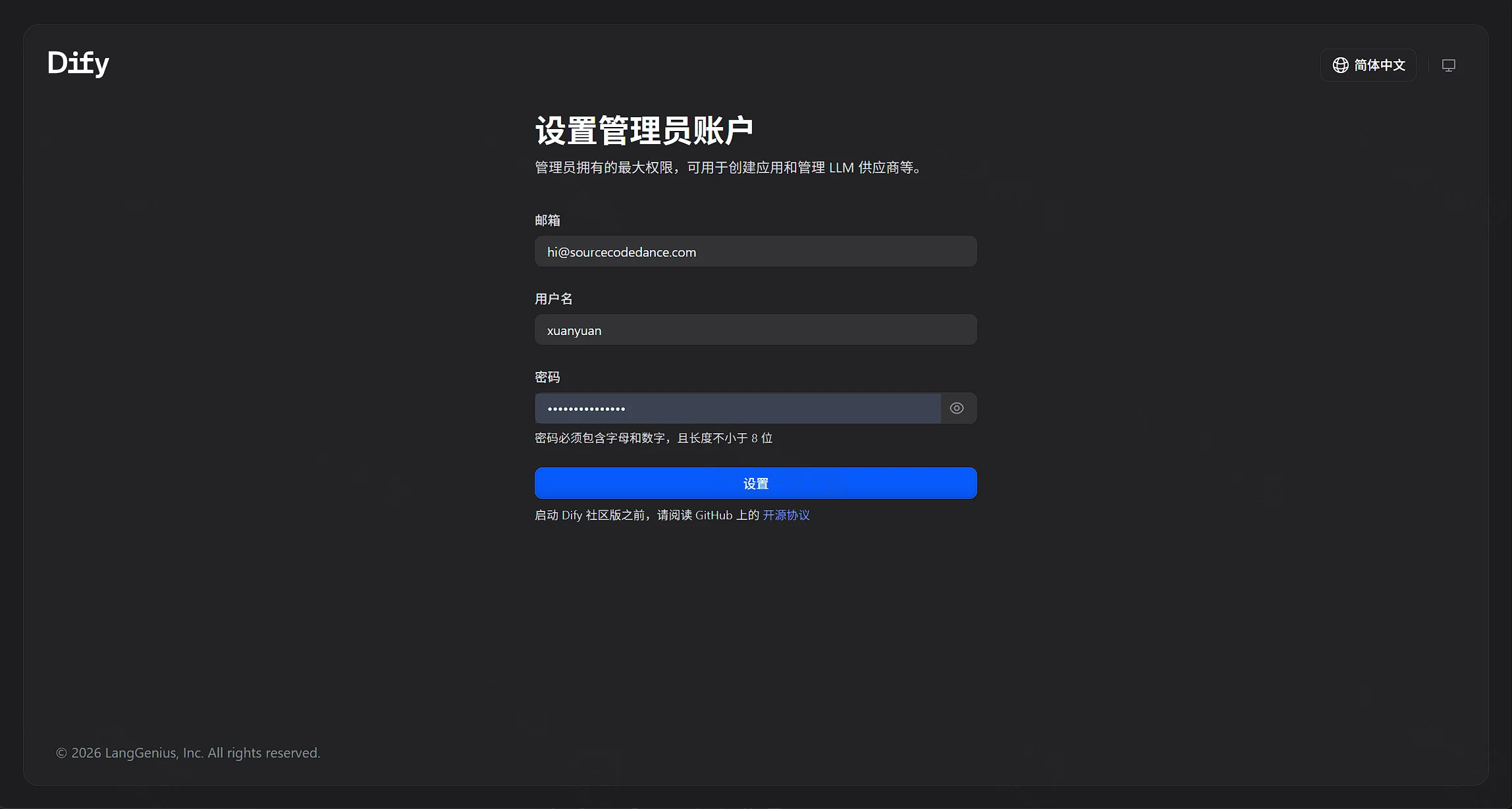
http://服务器IP/install。就在这台服务器上时,打开http://127.0.0.1/install。 - 右上角语言选简体中文。填写邮箱、用户名和密码。页面提示密码必须包含字母和数字,且长度不小于 8 位。填完后点「设置」。
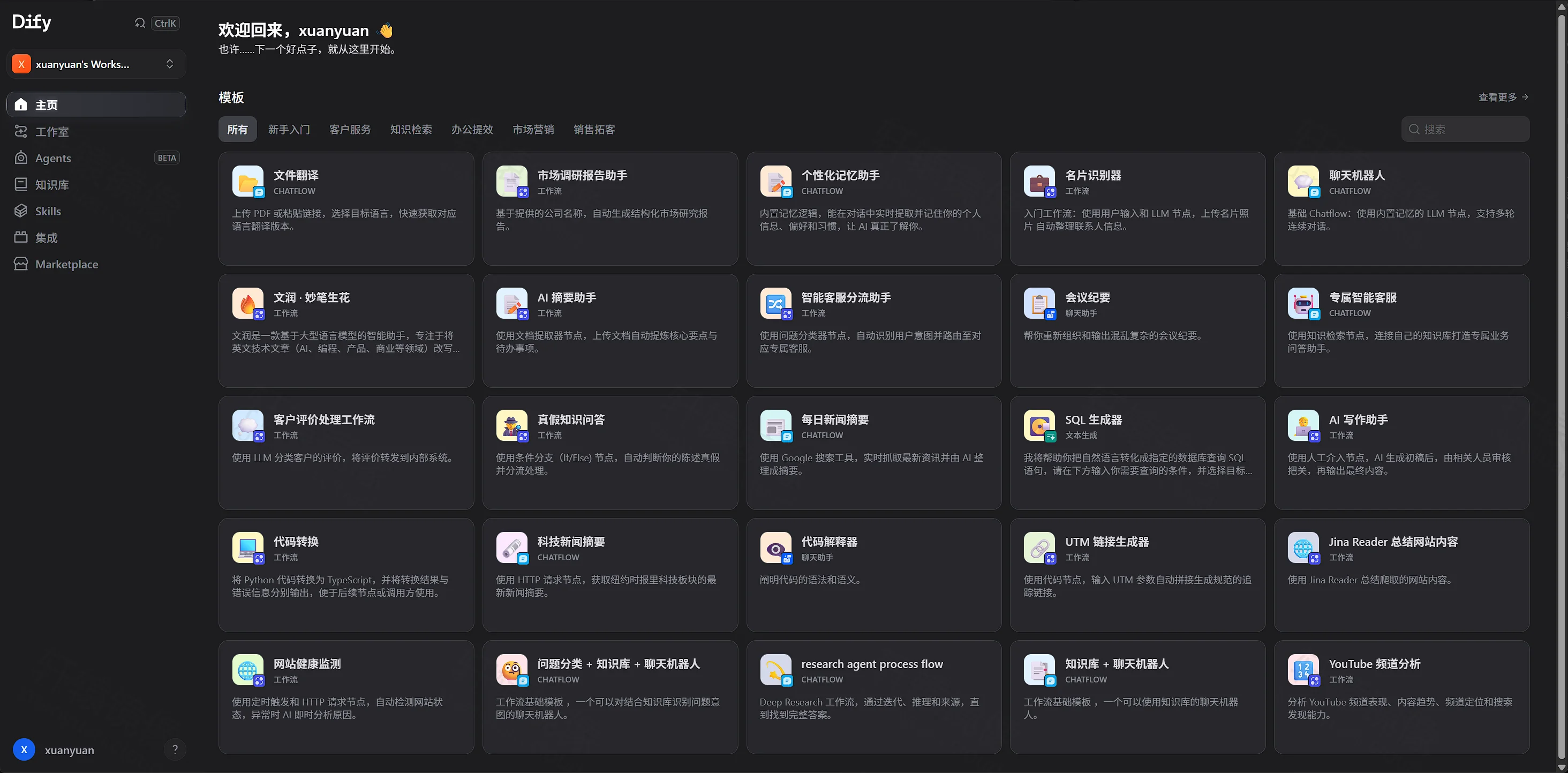
- 点「设置」后进入工作室。标题是「欢迎回来」,后面是刚才的用户名。左侧选中「主页」,同一列还有「工作室」「知识库」和 Agents。中间「所有」下列出应用模板。
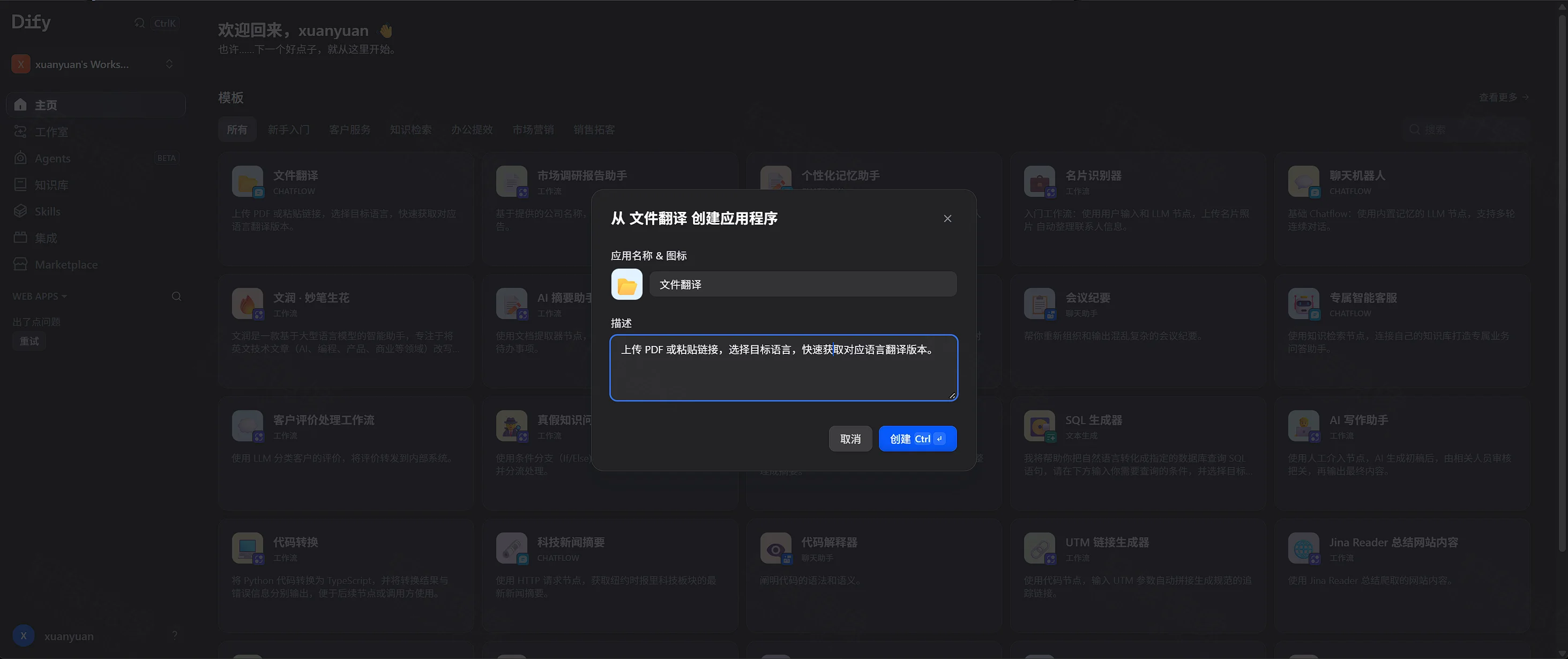
- 在模板里点「文件翻译」。对话框标题是「从文件翻译创建应用程序」,应用名称已是「文件翻译」,描述写着上传 PDF 或粘贴摘录。按钮是「取消」和「创建」。
- 对话和知识库要调用模型时,再到模型供应商里填写你自己的 API Key。安装页不会代填这项。
云服务器请在安全组放行 80。5003 是插件远程调试端口,不需要调试插件时不要对公网放行。PostgreSQL、Redis 和 Weaviate 没有映射到宿主机。
备选:docker run
没有 Docker Compose 时,用下面的 docker run 启动同一组容器。配置文件、.env 和令牌沿用「Docker Compose 部署」里已经写好的内容。
不要和 docker compose up -d 一起用。两边会抢 80、443、5003,容器里的主机名也会冲突。已经用 Compose 启动过时,先在 /www/wwwroot/dify 执行 docker compose down,再继续本节。
docker run 不会像 Compose 那样等待健康检查。下面只等待 PostgreSQL 接受连接。API 里的迁移仍要再等一会儿。
容器名使用 dify- 前缀。--network-alias 必须保持 api、web、db_postgres 这些服务名,Nginx 和 .env 里的主机名靠它们解析。
- 创建网络和 Agent 沙箱使用的卷。三个带
--internal的网络没有默认出站路由,沙箱只能通过 Squid 代理访问允许的地址。网络或卷已经存在时,对应的创建命令会报错,跳过那一行即可。
bashdocker network create dify_default
docker network create --internal dify_ssrf
docker network create --internal dify_agent
docker network create --internal dify_agent_proxy
docker volume create dify_agent_local_sandbox_home
docker volume create dify_agent_local_sandbox_workspace
- 修改上传目录的属主。这一条执行完就退出。
bashdocker run --rm
  --name dify-init-permissions
  -v /www/wwwroot/dify/volumes/app/storage:/app/api/storage
  docker.xuanyuan.run/library/busybox:1.37.0
  sh -c 'FLAG_FILE="/app/api/storage/.init_permissions"; if [ -f "$FLAG_FILE" ]; then echo "Permissions already initialized. Exiting."; exit 0; fi; chown -R 1001:1001 /app/api/storage && touch "$FLAG_FILE"'
- 启动 PostgreSQL、Redis 和 Weaviate。口令从
.env读取。
bashcd /www/wwwroot/dify
DB_USER=$(grep '^DB_USERNAME=' .env | head -n1 | cut -d= -f2-)
DB_PASSWORD=$(grep '^DB_PASSWORD=' .env | head -n1 | cut -d= -f2-)
DB_NAME=$(grep '^DB_DATABASE=' .env | head -n1 | cut -d= -f2-)
REDIS_PASSWORD=$(grep '^REDIS_PASSWORD=' .env | head -n1 | cut -d= -f2-)
WV_KEY=$(grep '^WEAVIATE_API_KEY=' .env | head -n1 | cut -d= -f2-)

docker run -d
  --name dify-db
  --network dify_default
  --network-alias db_postgres
  --restart unless-stopped
  -e POSTGRES_USER="$DB_USER"
  -e POSTGRES_PASSWORD="$DB_PASSWORD"
  -e POSTGRES_DB="$DB_NAME"
  -e PGDATA=/var/lib/postgresql/data/pgdata
  -v /www/wwwroot/dify/volumes/db/data:/var/lib/postgresql/data
  docker.xuanyuan.run/library/postgres:15.19-alpine
  postgres -c max_connections=200 -c shared_buffers=128MB -c work_mem=4MB -c maintenance_work_mem=64MB -c effective_cache_size=4096MB -c statement_timeout=0 -c idle_in_transaction_session_timeout=0

docker run -d
  --name dify-redis
  --network dify_default
  --network-alias redis
  --restart unless-stopped
  -e REDISCLI_AUTH="$REDIS_PASSWORD"
  -v /www/wwwroot/dify/volumes/redis/data:/data
  docker.xuanyuan.run/library/redis:6.2.24-alpine
  redis-server --requirepass "$REDIS_PASSWORD"

docker run -d
  --name dify-weaviate
  --network dify_default
  --network-alias weaviate
  --restart unless-stopped
  -e PERSISTENCE_DATA_PATH=/var/lib/weaviate
  -e QUERY_DEFAULTS_LIMIT=25
  -e AUTHENTICATION_ANONYMOUS_ACCESS_ENABLED=true
  -e DEFAULT_VECTORIZER_MODULE=none
  -e CLUSTER_HOSTNAME=node1
  -e AUTHENTICATION_APIKEY_ENABLED=true
  -e AUTHENTICATION_APIKEY_ALLOWED_KEYS="$WV_KEY"
  -e AUTHENTICATION_APIKEY_USERS=hello@dify.ai
  -e AUTHORIZATION_ADMINLIST_ENABLED=true
  -e AUTHORIZATION_ADMINLIST_USERS=hello@dify.ai
  -e DISABLE_TELEMETRY=false
  -v /www/wwwroot/dify/volumes/weaviate:/var/lib/weaviate
  docker.xuanyuan.run/semitechnologies/weaviate:1.39.13
- 等待 PostgreSQL 接受连接。这一步没有超时上限,数据库起不来时用 Ctrl+C 停下,再看
docker logs dify-db。
bashcd /www/wwwroot/dify
DB_USER=$(grep '^DB_USERNAME=' .env | head -n1 | cut -d= -f2-)
DB_NAME=$(grep '^DB_DATABASE=' .env | head -n1 | cut -d= -f2-)
until docker exec dify-db pg_isready -h 127.0.0.1 -U "$DB_USER" -d "$DB_NAME"; do
  sleep 2
done
- 启动两个 Squid、代码沙箱、插件守护进程、Agent 沙箱和 Agent 后端。
bashcd /www/wwwroot/dify
SANDBOX_KEY=$(grep '^SANDBOX_API_KEY=' .env | head -n1 | cut -d= -f2-)
PLUGIN_KEY=$(grep '^PLUGIN_DAEMON_KEY=' .env | head -n1 | cut -d= -f2-)
INNER_KEY=$(grep '^PLUGIN_DIFY_INNER_API_KEY=' .env | head -n1 | cut -d= -f2-)
PLUGIN_DB=$(grep '^DB_PLUGIN_DATABASE=' .env | head -n1 | cut -d= -f2-)
AGENT_TOKEN=$(grep '^DIFY_AGENT_API_TOKEN=' .env | head -n1 | cut -d= -f2-)
SHELL_TOKEN=$(grep '^DIFY_AGENT_LOCAL_SANDBOX_AUTH_TOKEN=' .env | head -n1 | cut -d= -f2-)
REDIS_PASSWORD=$(grep '^REDIS_PASSWORD=' .env | head -n1 | cut -d= -f2-)

docker run -d
  --name dify-ssrf-proxy
  --network dify_default
  --network-alias ssrf_proxy
  --restart unless-stopped
  -e HTTP_PORT=3128
  -e COREDUMP_DIR=/var/spool/squid
  -v /www/wwwroot/dify/ssrf_proxy/squid.conf.template:/etc/squid/squid.conf.template
  -v /www/wwwroot/dify/ssrf_proxy/squid-common.conf.template:/etc/squid/dify_common.conf.template
  -v /www/wwwroot/dify/ssrf_proxy/docker-entrypoint.sh:/docker-entrypoint-mount.sh
  --entrypoint sh
  docker.xuanyuan.run/ubuntu/squid:6.6-24.04_beta
  -c "cp /docker-entrypoint-mount.sh /docker-entrypoint.sh && sed -i 's/
$//' /docker-entrypoint.sh && chmod +x /docker-entrypoint.sh && /docker-entrypoint.sh"
docker network connect --alias ssrf_proxy dify_ssrf dify-ssrf-proxy

docker run -d
  --name dify-sandbox
  --network dify_ssrf
  --network-alias sandbox
  --restart unless-stopped
  --env-file /www/wwwroot/dify/.env
  -e API_KEY="$SANDBOX_KEY"
  -e GIN_MODE=release
  -e WORKER_TIMEOUT=15
  -e ENABLE_NETWORK=true
  -e HTTP_PROXY=http://ssrf_proxy:3128
  -e HTTPS_PROXY=http://ssrf_proxy:3128
  -e SANDBOX_PORT=8194
  -v /www/wwwroot/dify/volumes/sandbox/dependencies:/dependencies
  -v /www/wwwroot/dify/volumes/sandbox/conf:/conf
  docker.xuanyuan.run/langgenius/dify-sandbox:0.2.15

docker run -d
  --name dify-plugin-daemon
  --network dify_default
  --network-alias plugin_daemon
  --restart unless-stopped
  --env-file /www/wwwroot/dify/.env
  -e DB_DATABASE="$PLUGIN_DB"
  -e SERVER_PORT=5002
  -e SERVER_KEY="$PLUGIN_KEY"
  -e DIFY_INNER_API_URL=http://api:5001
  -e DIFY_INNER_API_KEY="$INNER_KEY"
  -e PLUGIN_REMOTE_INSTALLING_HOST=0.0.0.0
  -e PLUGIN_REMOTE_INSTALLING_PORT=5003
  -e PLUGIN_WORKING_PATH=/app/storage/cwd
  -p 5003:5003
  -v /www/wwwroot/dify/volumes/plugin_daemon:/app/storage
  docker.xuanyuan.run/langgenius/dify-plugin-daemon:0.6.10-local
docker network connect --alias plugin_daemon dify_ssrf dify-plugin-daemon

docker run -d
  --name dify-agent-ssrf
  --network dify_default
  --network-alias agent_ssrf_proxy
  --restart unless-stopped
  -e HTTP_PORT=3128
  -e COREDUMP_DIR=/var/spool/squid
  -v /www/wwwroot/dify/ssrf_proxy/squid-agent.conf.template:/etc/squid/squid.conf.template
  -v /www/wwwroot/dify/ssrf_proxy/squid-common.conf.template:/etc/squid/dify_common.conf.template
  -v /www/wwwroot/dify/ssrf_proxy/docker-agent-entrypoint.sh:/docker-entrypoint-mount.sh
  --entrypoint sh
  docker.xuanyuan.run/ubuntu/squid:6.6-24.04_beta
  -c "cp /docker-entrypoint-mount.sh /docker-entrypoint.sh && sed -i 's/
$//' /docker-entrypoint.sh && chmod +x /docker-entrypoint.sh && /docker-entrypoint.sh"
docker network connect --alias agent_ssrf_proxy dify_agent_proxy dify-agent-ssrf

docker run -d
  --name dify-local-sandbox
  --network dify_agent
  --network-alias local_sandbox
  --restart unless-stopped
  -e SHELLCTL_AUTH_TOKEN="$SHELL_TOKEN"
  -e HTTP_PROXY=http://agent_ssrf_proxy:3128
  -e HTTPS_PROXY=http://agent_ssrf_proxy:3128
  -e NO_PROXY=localhost,127.0.0.1
  -v dify_agent_local_sandbox_home:/home/dify
  -v dify_agent_local_sandbox_workspace:/workspace
  docker.xuanyuan.run/langgenius/dify-agent-local-sandbox:1.18.0
  shellctl serve --listen 0.0.0.0:5004 --require-auth-token
docker network connect --alias local_sandbox dify_agent_proxy dify-local-sandbox

docker run -d
  --name dify-agent-backend
  --network dify_default
  --network-alias agent_backend
  --restart unless-stopped
  --env-file /www/wwwroot/dify/.env
  -e DIFY_AGENT_REDIS_URL="redis://:${REDIS_PASSWORD}@redis:6379/2"
  -e DIFY_AGENT_PLUGIN_DAEMON_URL=http://plugin_daemon:5002
  -e DIFY_AGENT_PLUGIN_DAEMON_API_KEY="$PLUGIN_KEY"
  -e DIFY_AGENT_INNER_API_URL=http://api:5001
  -e DIFY_AGENT_INNER_API_KEY="$INNER_KEY"
  -e DIFY_AGENT_RUNTIME_BACKEND=local
  -e DIFY_AGENT_LOCAL_SANDBOX_ENDPOINT=http://local_sandbox:5004
  -e DIFY_AGENT_LOCAL_SANDBOX_AUTH_TOKEN="$SHELL_TOKEN"
  -e DIFY_AGENT_API_TOKEN="$AGENT_TOKEN"
  docker.xuanyuan.run/langgenius/dify-agent-backend:1.18.0
docker network connect --alias agent_backend dify_agent dify-agent-backend
- 启动 API、worker、定时任务、协作 WebSocket、网页和 Nginx。
bashcd /www/wwwroot/dify
INNER_KEY=$(grep '^PLUGIN_DIFY_INNER_API_KEY=' .env | head -n1 | cut -d= -f2-)
AGENT_TOKEN=$(grep '^DIFY_AGENT_API_TOKEN=' .env | head -n1 | cut -d= -f2-)

docker run -d
  --name dify-api
  --network dify_default
  --network-alias api
  --restart unless-stopped
  --env-file /www/wwwroot/dify/.env
  -e MODE=api
  -e RESPECT_XFORWARD_HEADERS_ENABLED=true
  -e INNER_API_KEY_FOR_PLUGIN="$INNER_KEY"
  -e AGENT_BACKEND_BASE_URL=http://agent_backend:5050
  -e AGENT_BACKEND_API_TOKEN="$AGENT_TOKEN"
  -v /www/wwwroot/dify/volumes/app/storage:/app/api/storage
  docker.xuanyuan.run/langgenius/dify-api:1.18.0
docker network connect --alias api dify_ssrf dify-api

docker run -d
  --name dify-worker
  --network dify_default
  --network-alias worker
  --restart unless-stopped
  --env-file /www/wwwroot/dify/.env
  -e MODE=worker
  -e INNER_API_KEY_FOR_PLUGIN="$INNER_KEY"
  -e AGENT_BACKEND_BASE_URL=http://agent_backend:5050
  -e AGENT_BACKEND_API_TOKEN="$AGENT_TOKEN"
  -v /www/wwwroot/dify/volumes/app/storage:/app/api/storage
  docker.xuanyuan.run/langgenius/dify-api:1.18.0
docker network connect --alias worker dify_ssrf dify-worker

docker run -d
  --name dify-worker-beat
  --network dify_default
  --network-alias worker_beat
  --restart unless-stopped
  --env-file /www/wwwroot/dify/.env
  -e MODE=beat
  docker.xuanyuan.run/langgenius/dify-api:1.18.0

docker run -d
  --name dify-api-websocket
  --network dify_default
  --network-alias api_websocket
  --restart unless-stopped
  --env-file /www/wwwroot/dify/.env
  -e MODE=api
  -e SERVER_WORKER_AMOUNT=1
  -e SERVER_WORKER_CLASS=geventwebsocket.gunicorn.workers.GeventWebSocketWorker
  -e SERVER_WORKER_CONNECTIONS=1000
  -e GUNICORN_TIMEOUT=360
  -v /www/wwwroot/dify/volumes/app/storage:/app/api/storage
  docker.xuanyuan.run/langgenius/dify-api:1.18.0

docker run -d
  --name dify-web
  --network dify_default
  --network-alias web
  --restart unless-stopped
  --env-file /www/wwwroot/dify/.env
  docker.xuanyuan.run/langgenius/dify-web:1.18.0

docker run -d
  --name dify-nginx
  --network dify_default
  --network-alias nginx
  --restart unless-stopped
  -e NGINX_SERVER_NAME=_
  -e NGINX_HTTPS_ENABLED=false
  -e NGINX_PORT=80
  -e NGINX_SSL_PORT=443
  -e NGINX_SSL_CERT_FILENAME=dify.crt
  -e NGINX_SSL_CERT_KEY_FILENAME=dify.key
  -e NGINX_SSL_PROTOCOLS="TLSv1.2 TLSv1.3"
  -e NGINX_WORKER_PROCESSES=auto
  -e NGINX_CLIENT_MAX_BODY_SIZE=100M
  -e NGINX_KEEPALIVE_TIMEOUT=65
  -e NGINX_PROXY_READ_TIMEOUT=3600s
  -e NGINX_PROXY_SEND_TIMEOUT=3600s
  -e NGINX_ENABLE_CERTBOT_CHALLENGE=false
  -e NGINX_SOCKET_IO_UPSTREAM=api_websocket:5001
  -p 80:80
  -p 443:443
  -v /www/wwwroot/dify/nginx/nginx.conf.template:/etc/nginx/nginx.conf.template
  -v /www/wwwroot/dify/nginx/proxy.conf.template:/etc/nginx/proxy.conf.template
  -v /www/wwwroot/dify/nginx/https.conf.template:/etc/nginx/https.conf.template
  -v /www/wwwroot/dify/nginx/conf.d:/etc/nginx/conf.d
  -v /www/wwwroot/dify/nginx/docker-entrypoint.sh:/docker-entrypoint-mount.sh
  -v /www/wwwroot/dify/nginx/ssl:/etc/ssl
  -v /www/wwwroot/dify/volumes/certbot/conf/live:/etc/letsencrypt/live
  -v /www/wwwroot/dify/volumes/certbot/conf:/etc/letsencrypt
  -v /www/wwwroot/dify/volumes/certbot/www:/var/www/html
  --entrypoint sh
  docker.xuanyuan.run/library/nginx:1.31.8
  -c "cp /docker-entrypoint-mount.sh /docker-entrypoint.sh && sed -i 's/
$//' /docker-entrypoint.sh && chmod +x /docker-entrypoint.sh && /docker-entrypoint.sh"
- 查看容器是否还在运行,再打开浏览器。
bashdocker ps --filter name=dify-
docker logs dify-api --tail 80
curl -sS -o /dev/null -w "%{http_code}
" http://127.0.0.1/install
安装页的打开方式与「浏览器首次使用」相同。
常见问题
Q1:只拉取 dify-web 能不能用?
不能。dify-web 只提供页面。接口在 dify-api 里,另外还要有 PostgreSQL、Redis、Weaviate、代码沙箱、插件守护进程、Agent 后端和 Nginx。本文这一组要一起启动。
Q2:拉取中途超时或被中断?
dify-agent-local-sandbox:1.18.0 这次有两次 timeout awaiting response headers,同一条 docker pull 再执行后完成。ubuntu/squid:6.6-24.04_beta 中断后重新拉取也完成。已经下载完的层会保留。
Q3:为什么网页不映射到宿主机 3000?
网页进程在容器网络里监听 3000,Nginx 用服务名 web 去访问它。宿主机 3000 常被本机前端开发占用。浏览器请走宿主机 80,地址是 http://服务器IP/install。
Q4:/install 显示「渲染此组件时发生了意外错误」?
页面 HTML 返回 200 只说明 Nginx 转到了 web。这句文案出现在 /console/api/system-features、/console/api/setup 或 /console/api/init 失败之后。api 仍在执行 Running migrations、状态还是 health: starting 时就会这样。
bashcd /www/wwwroot/dify
docker compose ps api
curl -sS http://127.0.0.1/console/api/setup
echo
curl -sS http://127.0.0.1/console/api/init
echo
api 变成 healthy,并且上面两条都返回 JSON 之后,刷新浏览器。若状态是 unhealthy,而日志只有 Running migrations,同时 /console/api/setup 返回 Nginx 的 502,说明入口还停在 flask upgrade-db,Gunicorn 还没监听 5001。Python 在非终端下会缓冲后续输出。先看数据库里有没有正在执行的语句:
bashcd /www/wwwroot/dify
docker stats --no-stream dify-api-1 dify-db_postgres-1
docker compose exec -u postgres db_postgres psql -d dify -c "SELECT pid, state, wait_event_type, wait_event, now()-xact_start AS xact_age, left(query,160) FROM pg_stat_activity WHERE datname='dify' AND pid <> pg_backend_pid();"
有正在执行的 SQL,并且 dify-api-1 的 CPU 不为 0 时,继续等,不要删 volumes/。语句停在 Lock 或 idle in transaction 时,先停掉另外三个也会启动迁移的容器,让 api 单独跑完:
bashdocker compose stop worker worker_beat api_websocket
查询结果是 0 行,同时 dify-api-1 的 CPU 接近 0,说明 flask upgrade-db 还没连上数据库。这次机器约 1.8 GiB 内存,低于上面的 4 GiB。先停掉迁移用不到的容器,只留数据库、Redis 和 api:
bashcd /www/wwwroot/dify
docker compose stop web nginx weaviate sandbox ssrf_proxy agent_ssrf_proxy local_sandbox agent_backend plugin_daemon worker worker_beat api_websocket
docker compose restart api
再查一次 pg_stat_activity。出现 SQL 后等到 api 为 healthy,再把刚才停掉的容器启动。nginx 没在运行时看 docker compose logs nginx --tail 80。80 或 443 被占用时,按「Docker Compose 部署」末尾的办法改宿主机端口,不要改成 3000。
Q5:local_sandbox 一直重启?
1.18.0 的启动参数带有 --require-auth-token。.env 里的 DIFY_AGENT_LOCAL_SANDBOX_AUTH_TOKEN 为空时,这个容器起不来。回到生成令牌的那一步,确认等号后面有值,再执行 docker compose up -d。
Q6:数据库、Redis 的默认口令是什么?
示例配置里的 DB_PASSWORD 和 REDIS_PASSWORD 都是 difyai123456。Weaviate 的示例密钥写在 .env 的 WEAVIATE_API_KEY。这是为了能启动,不是建议长期对公网使用的口令。第一次启动前修改。已经用默认口令初始化过数据目录之后,只改 .env 不会改掉 PostgreSQL 里已经写好的口令,需要同时处理已有数据,或在确认可以清空后删除 volumes/db 再启动。
Q7:对话没有回复?
安装页只创建管理员,不附带模型密钥。登录后要在模型供应商里填入你自己的 API Key。知识库还需要可用的向量模型。
Q8:从别的机器访问时,实时功能连到了 localhost?
.env 里的 NEXT_PUBLIC_SOCKET_URL 示例值是 ws://localhost。从另一台电脑打开页面时,如果协作连接指向你自己的电脑,把这项改成 ws://服务器IP,然后执行 docker compose up -d 重建 web。触发器要从外网回调时,同样检查 TRIGGER_URL 和 ENDPOINT_URL_TEMPLATE。本机打开安装页不依赖这几项。
Q9:如何升级?
先备份 /www/wwwroot/dify/volumes 和 .env。1.18.0 的发布说明要求 API、worker、Agent 后端和本地沙箱一起更换,不要只换网页镜像。新装的这份 .env 没有设置 PASSWORD_PEPPER。以后升级时不要临时加一个新的 pepper,否则已有密码对不上。
改 compose.yaml 里的标签后执行:
bashcd /www/wwwroot/dify
docker compose pull
docker compose up -d
Q10:macOS 上目录放哪里?
工作目录改成 ~/docker/dify,下面的 nginx/、ssrf_proxy/ 和 volumes/ 保持同样的相对结构。生成令牌时,sed -i 改成 sed -i ''。
Q11:如何停止与卸载?
确认不再需要管理员、知识库和上传文件之前,不要删除 volumes/。
Compose 停止并保留数据目录:
bashcd /www/wwwroot/dify
docker compose down
用 docker run 启动的,停止并删除容器,保留数据卷:
bashdocker rm -f dify-nginx dify-web dify-api-websocket dify-worker-beat dify-worker dify-api
  dify-agent-backend dify-local-sandbox dify-agent-ssrf dify-plugin-daemon dify-sandbox
  dify-ssrf-proxy dify-weaviate dify-redis dify-db
账号和数据都不再需要时,再删除目录和命名卷:
bashrm -rf /www/wwwroot/dify
docker volume rm dify_agent_local_sandbox_home dify_agent_local_sandbox_workspace
命令速查
bashdocker pull docker.xuanyuan.run/langgenius/dify-api:1.18.0
docker pull docker.xuanyuan.run/langgenius/dify-web:1.18.0

cd /www/wwwroot/dify
docker compose up -d
docker compose ps
docker compose logs api --tail 80
curl -sS -o /dev/null -w "%{http_code}
" http://127.0.0.1/install

docker compose down
没有 Compose 时用「备选:docker run」里的命令。浏览器打开 http://服务器IP/install。没有预置账号。其余镜像的拉取命令在「拉取镜像」。
延伸阅读
阅读原文
本文基于 langgenius/dify-web:1.18.0 与 langgenius/dify-api:1.18.0,以 1.18.0 版本实测,测试平台 Ubuntu 24.04 Linux。
评论交流
免责声明
本博客文章所提供的内容、技术方案、配置示例及部署指南等信息,仅供学习交流和技术参考使用。文章内容基于发布时的技术环境和版本信息编写,可能因时间推移、技术更新或环境差异而存在不适用的情况。
用户在参考本博客内容进行部署操作前,应当充分了解相关技术风险,并建议在测试环境中进行充分验证和测试,确认无误后再考虑在生产环境中使用。生产环境部署前,请务必进行数据备份,并制定相应的回滚方案。
用户因使用本博客内容进行部署操作而产生的任何损失、数据丢失、系统故障、安全风险或其他问题,均由用户自行承担全部责任。轩辕镜像官方不对因使用本博客内容而产生的任何直接或间接损失承担责任。
本免责声明的最终解释权归轩辕镜像官方所有。